

TeeHee
A free, open source, lightweight text expander for Windows
20 followers
A free, open source, lightweight text expander for Windows
20 followers
A free, open source, lightweight text expander that works everywhere on Windows. Whether you're in Word, Chrome, Slack, or VS Code, TeeHee turns your abbreviations into full text instantly. Type less, maintain consistency, and speed up your workflow.




Hi Product Hunt !
I'm Michel, the maker of TeeHee, a free, simple, lightweight text expander for Windows 10 & 11.
📖 A little backstory:
Wanted to try out building a very simple and lightweight Windows app, that would act as a text expander. I built it thinking about how to make it simple, easy, accessible to anyone. My previous experience with such tools was not the best as either the tool needed to fiddle with config files, adapt to start properly on Windows startup, fix issues with incorrect text replacement, weird speed and behavior and so on. I decided to give it a try. The code is open source and totally available on Github by the way.
🚀 What it can do:
Instant Expansion: Type your trigger anywhere on Windows and watch it instantly expand to your defined text. No delays, no hassle.
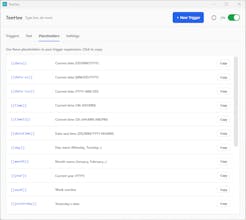
Dynamic Placeholders: Use built-in placeholders like {{date}}, {{time}}, {{clipboard}}, and more to insert dynamic content automatically.
System-Wide: Works everywhere, emails, documents, browsers, code editors, chat apps. If you can type there, TeeHee works there.
Categories: Organize your triggers into categories for easy management. Filter and find what you need in seconds.
Pause & Resume: Quickly toggle text expansion on or off from the system tray. Visual indicator shows current status.
Import & Export: Backup your triggers or share them across devices. Your data is stored locally in a simple JSON file.
Lightweight: Runs quietly in your system tray using minimal resources. Single instance only, no duplicates.
Modern Interface: Beautiful dark-themed UI that's easy on the eyes. Managing your triggers has never looked this good.
Privacy First: 100% offline. No data collection, no analytics, no accounts. Your triggers stay on your computer.
🤔 Who is this for?
Anyone power user who wishes to gain a little bit of time, avoiding to type again and again the same sentences, text, contact details, links, and so on.
It can also help customer support teams, developers, email professionals and more.
💬 I'd love your feedback: what features would make TeeHee most useful for you, while keeping it simple and easy? Or what would you like to see next? Maybe new sort of placeholders ?
Thanks for checking it out! 🙏