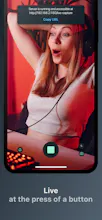
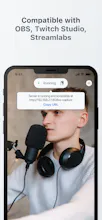
Use your iPhone as a Webcam in your livestreams. Streams the camera output to a webpage that can be imported in most livestream studio software such as OBS, Twitch Studio or Streamlabs. No cables required, no extra software to install on your computer. Streamcam just works
I've been livestreaming quite a bit in the past year and eventually wanted to have a face-cam, but didn't want to buy an expensive, dedicated camera.
I have an iPhone already, surely there must be apps which allow me to use it as a webcam, and which work with Windows/Linux?
Well, sure, there are, but they all require your iPhone to be tethered to your pc, and/or to install 3rd party software to pick up your iPhone as a virtual camera.
I just wanted something that worked from the get-go and didn't require being plugged-in, so I decided to write my own app to address those needs.
In effect, StreamCam runs a webserver on your device which serves your camera output through websockets on a webpage, meaning you can just use it on any system that supports web-browsers. And in turn, this can then be used in most common streaming software out there (OBS, Streamlabs, Twitch Studio etc..) as a 'Browser Source' layer.
The app is free to use but locks configuration behind a (small) paywall, if you want to stream in higher res or at 60fps. The free version is tailored for streamers who only have need a thumbnail-sized facecam in their streams, but the paid version allows for up to 4K 60fps output, in real-time!
The app is available on the app store at: https://apps.apple.com/app/id162...
I've also made a product website at https://streamcam.app with FAQs, setup pages etc.
Let me know what you think 🙌
Report
@dorian_grolaux A toast to the launch. <3
Genuinely rooting for your success.
This is awesome! Is this needed though if you have the new MacOS that allows you to do this now? Or are there are additional features here that MacOS doesn't have for doing this?
@britt_joiner hey Britt, thanks for your comment 🙌 yes Apple introduced this feature but it is very much limited to MacOS only; my solution is OS-agnostic 👌
Report
I work with a Windows laptop and sometimes need to share my notes on video calls. I need this in my life.



StreamCam
StreamCam
StreamCam
Trello Tip Generator and Newsletter
StreamCam
StreamCam
What to Eat in
StreamCam
StreamCam
StreamCam
Llamao
StreamCam