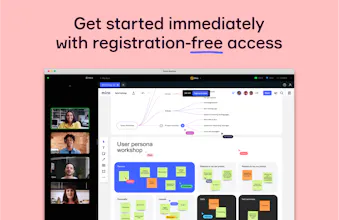
The online collaborative whiteboard platform that enables distributed teams to work effectively together, from brainstorming with digital sticky notes to planning and managing agile workflows.
Reviews praise Miro for effortless collaboration, intuitive templates, and an infinite canvas that scales from quick notes to complex workflows. Makers of
highlight its creative freedom. Users love Talktrack, real-time co-editing, and versatile diagramming. Common asks: faster performance on large boards, a less cluttered interface, improved sharing/navigation, and more polished legacy features.
Indispensable for workshops, especially when the team is spread across different cities. We’ve completely replaced physical sticky notes and flipcharts - brainstorming and retros now run much more dynamically. Everyone sees the same board and can vote in real time.
What needs improvement
slow performance (4)
Performance on very large boards. When a project runs for years and thousands of sticky notes and diagrams pile up, the interface starts to noticeably lag during navigation, which breaks the flow of thought.
vs Alternatives
Task synchronization here is more transparent for the entire development team
How reliable is performance during remote workshops?
Overall, it handles the load really well, especially when up to 10–15 people are in a session. But if we jump into a huge, old board with thousands of objects, you start to notice freezing and rendering delays
As an illustrator, Miro is not the first tool that comes to mind when thinking about creating artwork. Yet, it has become an invaluable part of my workflow in terms of brainstorming, planning, and collaborating on projects.
One of the best features Miro offers is the infinite canvas. It's perfect for mind-mapping, storyboarding, or sketching out ideas and concepts. It feels like an endless whiteboard where I can let my creativity run wild without worrying about space constraints.
Miro's collaboration capabilities are another significant advantage. The ability to work with clients or other team members in real-time is a game-changer. The interactive features like comments, tagging, and live cursors provide a dynamic and immersive collaborative experience.
I also appreciate Miro's integration with other tools I frequently use, such as Google Drive, Adobe Creative Cloud, and Slack. This interoperability makes my workflow more streamlined and cohesive.
However, Miro isn't the tool to use for creating detailed or polished illustrations. The drawing tools available are basic and lack the precision and control that other specialized illustration software offers. While it's great for rough sketches and wireframes, it won't replace Photoshop or Illustrator for creating high-quality artwork.
In summary, Miro has been a revelation in the brainstorming and planning stages of my illustration process. The interactive, collaborative whiteboard space is great for sketching out ideas, receiving feedback, and working together with team members. Despite the lack of advanced drawing features, it's the planning, brainstorming, and collaborative features that make Miro shine.
For illustrators who often work as part of a team or require a tool for effective planning and ideation, I highly recommend giving Miro a try. Just remember that you'll likely need to pair it with a more robust drawing tool to complete your final artwork.
What's great
infinite canvas (1)real-time collaboration (5)collaborative features (28)brainstorming tool (22)
I use Miro for brainstorming and team collaboration, and I really like its intuitive whiteboard and wide range of templates. It makes visualizing ideas easy and keeps everyone on the same page. However, the interface can sometimes feel cluttered, and performance slows down with large boards. Overall, it’s a great tool but could use some improvements in speed and simplicity.
What's great
collaborative features (28)brainstorming tool (22)predefined templates (7)