
Stacktora
Define once, run anywhere.
7 followers
Define once, run anywhere.
7 followers
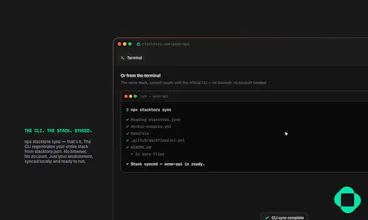
This is developer onboarding infrastructure. The end of configuration drift for every engineer — it’s over. Stacktora isn't a docker-compose generator. It's the workflow that keeps every developer's environment identical, current, and runnable — from the first clone to the hundredth hire. Define your stack — languages, databases, services — and Stacktora generates a production-ready, runnable bootstrap: docker-compose, Makefile, CI, and 15+ files. Clone, to running in minutes.



The teaser copy itself is sharp, that line about ending configuration drift lands hard. Curious how the 15+ generated files stay coherent as stacks get more complex without turning into another maintenance burden.
@sunakphh — the generated files are never meant to be hand-maintained individually — stacktora.json is the single source of truth, and every file (compose, Makefile, CI, README, the works) is deterministically regenerated from it. So "staying coherent" isn't something you have to manage yourself, it's the actual mechanism. Change a runtime version or add a service in the recipe, re-run `stacktora sync`, and the whole set updates together instead of drifting apart the way hand-edited configs do.
That's also why the CLI has a `check` command separate from `sync` — it diffs your working files against what the recipe would generate, so you can see drift before it becomes a production surprise, even if someone on the team hand-tweaked a file directly.
The honest tradeoff: if you need something the generator doesn't support yet, you're stuck editing a generated file directly (which then technically "drifts" until the recipe catches up) or waiting on us to add it. We're expanding coverage steadily, but it's worth knowing going in.
Appreciate you actually digging into the mechanics instead of just kicking Stacktora's tires — exactly the kind of question I like getting on launch day.
Ezra
stacktora is an npm package you run via npx.
To run your stack defined in stacktora.json, navigate to the directory containing that file and run:
bash
If the tool requires the config file as an argument (some tools do, some default to stacktora.json), try:
bash
T
o confirm the correct usage, you can check the help menu first:
bash
It is built for CI and AI agents.
The result below is a DeepSeek test:
(DeepSeek) A few things to keep in mind:
Make sure you're in the right folder (where stacktora.json lives).
npx will download the package temporarily if you don't have it installed globally. If you want to install it globally instead: npm install -g stacktora then just run stacktora.
If you run into any errors (e.g., file not found, permission issues, or invalid JSON), paste the error message back here and I'll help you debug.
CLI & stacktora.json
Every project includes a stacktora.json — a small, secret-free record of your stack (runtime, datastores, services, ports, options). The official Stacktora CLI reads that file and regenerates your project's files locally, using the exact same engine as this site — no account, no network, fully offline.
This keeps a project's dev environment from drifting — when you change a port or add a service inside stacktora.json and re-run sync, your local files update to match without touching .env or any other untracked file. Add --json to check, plan, doctor, status, recipes, or audit for structured output built for CI pipelines and AI agents, rather than parsing colored terminal text.
Each custom environment variable can also carry a source — a plain-text pointer to where the real value actually lives (a vault path, a 1Password item, wherever your team keeps it). Stacktora never stores the secret itself, only where to find it, and prints it as a comment above the variable in your generated .env and .env.example.
If your formatter is Prettier, an optional tools.codeStyle block (semicolons, quote style, line width) generates a real .prettierrc.json matching your preferences — leave it out and nothing changes from the default output.
Every stacktora.json Stacktora writes includes a $schema field pointing at a real JSON Schema — most editors (VS Code included) pick this up automatically for autocomplete and inline validation while you hand-edit the file, catching typos like an invalid datastore id before you ever run sync.
stacktora recipes and stacktora install <id> pull from the same curated stack list as the templates gallery. Teams can also drop their own recipe files in .stacktora/recipes/*.json — these are listed first and take priority over the bundled ones, so a repo can standardize on its own baseline without waiting on anything server-side.
For enforcing standards rather than just suggesting them, a company.stacktora.json next to the recipe lets stacktora audit check allowed/banned runtimes, tooling, datastores, and services, require a source note on every secret, and require specific output files to be enabled — no server needed, just a file committed to the repo.
Prefer to enforce this in CI without installing the CLI at all? stacktora/audit-action runs the same schema and policy checks as a GitHub Action — add uses: stacktora/audit-action@v1 to a workflow and every pull request gets validated automatically.
Everything above is fully offline by default. Add --remote to recipes or install to also reach the public registry at stacktora.com/registry — a static, no-account list of community recipes. This is opt-in only; neither command ever touches the network without it.
CLI & stacktora.json
Every project includes a stacktora.json — a small, secret-free record of your stack (runtime, datastores, services, ports, options). The official Stacktora CLI reads that file and regenerates your project's files locally, using the exact same engine as this site — no account, no network, fully offline.
This keeps a project's dev environment from drifting — when you change a port or add a service inside stacktora.json and re-run sync, your local files update to match without touching .env or any other untracked file. Add --json to check, plan, doctor, status, recipes, or audit for structured output built for CI pipelines and AI agents, rather than parsing colored terminal text.
Each custom environment variable can also carry a source — a plain-text pointer to where the real value actually lives (a vault path, a 1Password item, wherever your team keeps it). Stacktora never stores the secret itself, only where to find it, and prints it as a comment above the variable in your generated .env and .env.example.
If your formatter is Prettier, an optional tools.codeStyle block (semicolons, quote style, line width) generates a real .prettierrc.json matching your preferences — leave it out and nothing changes from the default output.
Every stacktora.json Stacktora writes includes a $schema field pointing at a real JSON Schema — most editors (VS Code included) pick this up automatically for autocomplete and inline validation while you hand-edit the file, catching typos like an invalid datastore id before you ever run sync.
stacktora recipes and stacktora install <id> pull from the same curated stack list as the templates gallery. Teams can also drop their own recipe files in .stacktora/recipes/*.json — these are listed first and take priority over the bundled ones, so a repo can standardize on its own baseline without waiting on anything server-side.
For enforcing standards rather than just suggesting them, a company.stacktora.json next to the recipe lets stacktora audit check allowed/banned runtimes, tooling, datastores, and services, require a source note on every secret, and require specific output files to be enabled — no server needed, just a file committed to the repo.
Prefer to enforce this in CI without installing the CLI at all? stacktora/audit-action runs the same schema and policy checks as a GitHub Action — add uses: stacktora/audit-action@v1 to a workflow and every pull request gets validated automatically.
Want the same checks live in your editor instead of waiting for CI? The Stacktora VS Code extension validates stacktora.json against company.stacktora.json as you type — inline warnings on the exact field, plus a status bar summary.
Everything above is fully offline by default. Add --remote to recipes or install to also reach the public registry at stacktora.com/registry — a curated, admin-reviewed list of community recipes served from a real database. This is opt-in only; neither command ever touches the network without it. Any signed-in account can propose a recipe at stacktora.com/submit.
Our Five Pillars
1. Stack Definition Engine
stacktora.json widens from “recipe for the initial generate” into the single source of truth for the whole project over its life: runtime, datastores, CI, references to where real secrets live (never the secrets themselves), deployment targets, and team coding standards. Edit the recipe, regenerate everything, forever — and, see the diff before it touches anything already running.
2. AI Context Layer
AI coding agents — Claude Code, Codex, and whatever comes next — read stacktora.json directly instead of inferring a project's setup by scanning files and guessing. Fewer wrong assumptions, cheaper and more accurate prompts, and it works for any agent, not just tooling Stacktora builds itself. This is no longer a bet on where the industry might go — it's the exact ground Vercel and Supabase are actively fighting over this quarter.
3. Recipe Marketplace
Installable, opinionated starting recipes — an official Stripe SaaS starter, a healthcare-compliant stack, a fintech baseline — shared or sold by companies, consultancies, and the community. This is the same instinct behind the Terraform Registry or Vercel's integrations marketplace: real network effects come from other people building on top of your format, not just from what you build yourself.
4. Enterprise standardization
A company.stacktora.json that enforces an organization's standards across every developer, every repo, every new hire — and every AI agent touching the codebase. Internal platform teams already build this by hand, badly, at every company that reaches a certain size. Stacktora could ship it as a product instead of leaving every company to reinvent it.
5. Becoming a standard
The long game. If CI systems, cloud platforms, and AI tools can all read the same recipe format, stacktora.json stops being “a file our tool happens to generate” and starts being infrastructure — the way Git, Docker, and Terraform's own HCL became infrastructure.
#supabase #vercel #json #cli #git #docker
1/ Shipped something today I actually think matters: stacktora mcp
Your AI agent can now read, scaffold, audit, and install stacks directly — no shell-out, no text parsing, no separate service to babysit.
Zero VCs. Infinite spite. Still building alone. 🧵
2/ The lazy version of this feature is a hosted remote MCP server.
The problem: an agent scaffolding a project has to write files to YOUR disk. A server sitting on my box can't touch your laptop. So "remote" was never actually an option — it just took me admitting that.
3/ So instead of standing up new infra, I bolted an MCP server directly onto the CLI you already have installed.
Same package. Same version. Same battle-tested engine that's been generating real projects for weeks. npx -y stacktora mcp and you're done.
4/ 10 tools, one per existing command: read · init · install · recipes · sync · check · plan · audit · doctor · status
If your agent can already run the CLI, it can now do the exact same things without you translating its output back into text for it.
5/ Didn't just write this and hope. Tested every path before shipping:
✅ install → read → sync → verified 12 real files hit disk
✅ a real policy violation, correctly caught
✅ unknown recipe, already-exists, unknown tool — all fail clean, nothing crashes
✅ malformed input on stdin — ignored, not fatal
✅ no Docker installed — degrades gracefully instead of exploding
6/ The unglamorous part nobody tells you about building on MCP: stdout IS the transport channel.
Every existing CLI command prints colored text to stdout. Wire those in directly and you corrupt your own protocol the first time anything prints.
So none of the existing commands got touched. Every tool is a fresh function returning data, not text. Old CLI: 100% untouched. New surface: fully additive.
7/ This is Pillar 2 of the whole reason Stacktora exists — agents reading your actual config instead of guessing at it from vibes and file-scanning.
Compliance dashboard did the "make sure it's still true" side. This does the "let the agent act on it" side.
8/ Bootstrapped. Solo. No roadmap committee. Just shipped it because it needed to exist.
npm i -g stacktora → stacktora.com
#buildinpublic #solofounder #bootstrapped #indiehackers #devtools #MCP