Spectrum: Figma Plugin & Web App

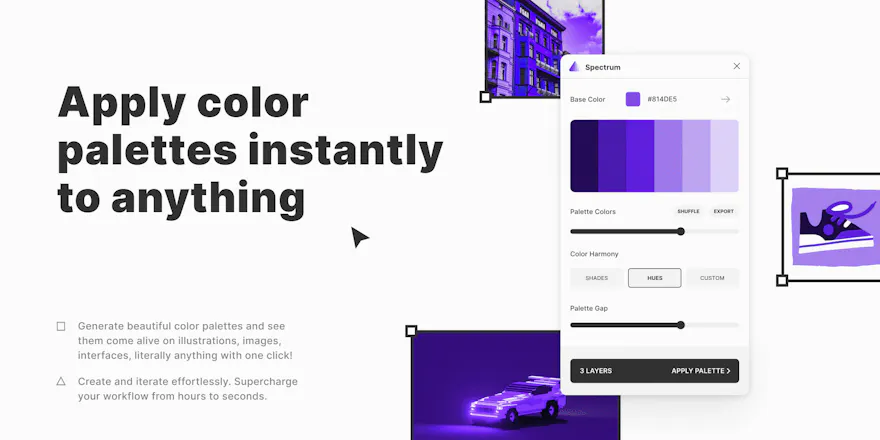
Generate color palettes and apply instantly to anything!

5.0
1 review

13 followers

With Spectrum, working with colors has never been this easy. Break out of the trial-error loop & instantly see how color palettes come alive on your design. Supercharge your workflow from hours to seconds!
Spectrum: Figma Plugin & Web App gallery image
Free Options
Launch Team
Framer
Framer
Launch websites with enterprise needs at startup speeds.
Promoted

What do you think? …

Milan Maheshwari
Namaste PH community! I am a digital product designer based in India. Super excited to launch my side project Spectrum on Product Hunt 🐱. A little more about me: What started as a creative hobby of building things from my childhood, slowly turned into a profession of designing digital experiences for the people. On the side, I like dabbling with code and motion design. Recently I've been creating Figma plugins as side projects. About Spectrum and Figma: Finding the right color palette 🎨 for any design project is a very time consuming task ⌛. Even with all the online generators available I used to spend a lot of time figuring out the right palette and then realising it doesn't work when I applied it on my design. 😩 What if there was a way any palette could come alive on what you're working on. Instead of shuffling palettes you could create different iterations effortlessly. With Spectrum, all of this is possible. Now you can generate beautiful palettes and applying them to any image, illustration, UI, gradient, literally anything with one click. Making the whole process super easy, fast and fun to do. ✨ Can't wait to see your thoughts pour in. Feel free to send any suggestions or feature requests. You can find me over twitter: twitter.com/millons098
Maria
Absolutely g-r-e-a-t! *_* Firstly - so nice interface, simple and very intuitive! The platform is awesome and it allows designers or anyone who is in the creative world to fix and adjust needed elements in just few clicks, with a bunch of creative possibilities and combinations! Congratulations for making every detail so nicely and congratulations for the launch! ^_^ I am looking forward to starting using this tool very soon! ^_^
Milan Maheshwari
@maria_brm thank you so much for the kind words. So glad that you liked it.
Maria
@milan_maheshwari1 Btw, I have one question :) Is it possible to use Spectrum also on gif and video files maybe? ^_^
Milan Maheshwari
@maria_brm currently it's for statics only, but maybe in the future.
Maria
@milan_maheshwari1 Thanks for the answer! It was just a hinting idea, would like to see it ^_^ I wish you all the luck in further development, and an endless source of inspiration! ^_^
Alex Miller
Really coo... @milan_maheshwari1 How does it work?
Milan Maheshwari
Oh that's a long story @fotoflo! In a nutshell, it generates colors based on the Golden Ratio and applies the palette colors closest to the original artworks' palette.
Alex Miller
@milan_maheshwari1 Wow that's interesting to hear. Sorry im really curious... what does the Golden Ratio have to do with color generation?
Milan Maheshwari
@fotoflo I'll planning to share a thread on twitter for this. Basically like shapes, hue/saturation also work well when related by the golden ratio.
Ridd
Excellent work Milan 👏
Milan Maheshwari
Thanks a lot Michael!
Rutik Wankhade
been following its development on twitter. great stuff man! Congrats on the launch 🚀
Milan Maheshwari
Thanks @rutikwankhade Was trying my very best to share and build this in public. Glad that you've been following!
Make Good
Interesting idea! I can say, that it is really difficult sometimes to find good picture AND in right color scheme. That types of filters do you use to make a change, yet to save balance and not to distort picture?
Milan Maheshwari
@make_good glad that you find it interesting! Spectrum actually applies no filters but the generated color palette directly on pixel level. So that the light and saturation remains balanced depending on the original image (or any vector).
Make Good
@milan_maheshwari1 Nice! Good job!
Eleanor Morrison
Oh. This is great!
123
Next
Last