Launching today

SparkBots AI (Powered by Jev)
Instantly extract key details and analyze any webpage or PDF
61 followers
Instantly extract key details and analyze any webpage or PDF
61 followers
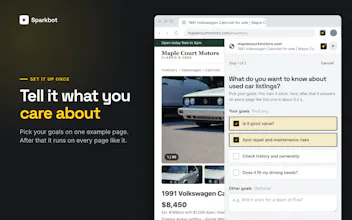
SparkBots can be trained to deeply analyze any web page or PDF. Once trained, your Sparkbot can be run on similar pages returning answers in less than a second. Perfect for analyzing and extracting key details for leads, businesses, resumes, listings, contracts or any PDF. SparkBot use AI, but it isn't a slow LLM like Claude or ChatGPT. It can't hallucinate or make up details that don't exist. Every answer comes straight from the content on the page and anything it doesn't find is left blank.


Free Options
Launch Team / Built With


CloudflareStill paying to deploy your apps? Try Cloudflare Workers for free
Promoted
Hey Product Hunt, Malcolm here from Hello Spark.
I built SparkBot because I found myself pulling the same information and asking questions about leads. Using an LLM was slow, and it would sometimes confidently give me details that weren't on the page. RPA tools were brittle and took forever to set up.
So I built something in between. SparkBot is a Chrome side panel that answers your own questions about the page you're on, whether that's a listing, spec sheet, contract, lead profile, PDF, or website.
What makes it different:
Describe what you want to know, and in about 20 seconds you have a SparkBot that runs the same analysis on every similar page
Every answer links back to the exact line it was pulled from
If the page doesn't say it, the answer stays blank. It is incapable of making things up.
I'd love to hear what you'd use it for. Happy hunting!
@hellosparkai "If the page doesn't say it, the answer stays blank" is exactly what I want from a research tool. Would love to try it on building spec sheets and competition briefs. Congrats from a fellow maker launching today! 🙌
@hellosparkai How does it handle situations where the required information is spread across multiple pages ?
The source link is the bit I'd keep open when reviewing a result. A spec sheet can put an important condition just after the number you're looking for.
@nicholas_zakas Yes! It's a simple prompt and it will also suggest additional options after analyzing the content
Leaving an answer blank instead of guessing is the part I trust most here, especially for contracts and spec sheets. How does that hold up on a long PDF where the key detail is in a table or a footnote — does the source link still point to the exact line, or does it point to the page as a whole? And when a trained SparkBot runs on a similar page with a slightly different layout, what happens if that field has moved?