macOS has one volume slider and no equalizer. SOUND gives every playing app its own 8-band EQ, independent volume, and output device—right from the menu bar. No virtual audio driver or account; audio stays on your Mac. Free and available in 10 languages.
I built SOUND because of a small daily annoyance I couldn't stop noticing: my Mac has exactly one volume, and no equalizer at all. A podcast is boomy, a game is harsh, one browser tab is twice as loud as everything else — and the only lever macOS gives you is "turn it all down."
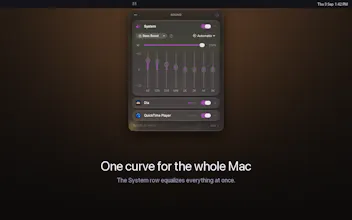
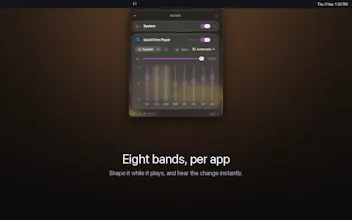
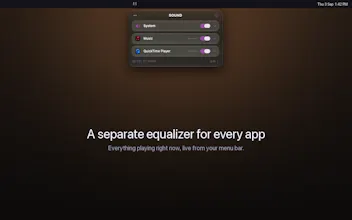
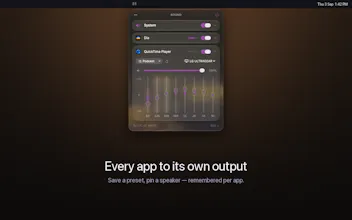
SOUND lives in the menu bar. Every app that's currently playing shows up with its own 8-band EQ (63 Hz to 8 kHz, ±12 dB), its own volume, and its own output device — so you can pin a call to your speakers while music keeps going to your headphones. There's a System master for everything you haven't touched, six presets to start from (Flat, Reduce Bass, Bass Boost, Vocal, Podcast, Bright), and one power toggle that puts every app back to untouched audio.
Two things I want to be upfront about:
It needs macOS 26. SOUND is built on the modern Core Audio process-tap API and the Liquid Glass design system. That's what makes it work with zero virtual audio drivers — no kernel extension, no fake output device, nothing to uninstall later. The cost is that older macOS versions can't run it.
It asks for system audio permission, once. That's the OS gate for reading an app's audio so it can be equalized. Nothing is recorded, stored, or uploaded • the processing happens locally, in real time, in the audio callback, and there's no account and no server to send anything to.
@bonnie_lu27 There are other tools I can recommend for earlier versions, but macOS 26 allowed me to build the solution without the need of a virtual driver. gotta wait for those updates :)
Report
Okay the one app is suddenly way louder than everything else problem is very real.
@roger_wang27 Exactly 😅 That sudden volume jump is one of the main reasons I built SOUND. Which app causes it most often for you? I’d love to test that specific setup.
Report
The separate output per app is actually the part that grabbed me.
Being able to control one browser tab or app without changing everything else is something I’ve wanted on Mac for a while. The single volume slider gets limiting pretty quickly for me.


Totem Word
Hey Product Hunt 👋
I built SOUND because of a small daily annoyance I couldn't stop noticing: my Mac has exactly one volume, and no equalizer at all. A podcast is boomy, a game is harsh, one browser tab is twice as loud as everything else — and the only lever macOS gives you is "turn it all down."
SOUND lives in the menu bar. Every app that's currently playing shows up with its own 8-band EQ (63 Hz to 8 kHz, ±12 dB), its own volume, and its own output device — so you can pin a call to your speakers while music keeps going to your headphones. There's a System master for everything you haven't touched, six presets to start from (Flat, Reduce Bass, Bass Boost, Vocal, Podcast, Bright), and one power toggle that puts every app back to untouched audio.
Two things I want to be upfront about:
It needs macOS 26. SOUND is built on the modern Core Audio process-tap API and the Liquid Glass design system. That's what makes it work with zero virtual audio drivers — no kernel extension, no fake output device, nothing to uninstall later. The cost is that older macOS versions can't run it.
It asks for system audio permission, once. That's the OS gate for reading an app's audio so it can be equalized. Nothing is recorded, stored, or uploaded • the processing happens locally, in real time, in the audio callback, and there's no account and no server to send anything to.
It's free, ships in 10 languages, and follows your system language. Install it from the Mac App Store: https://apps.apple.com/app/sound...
I'd love to know: which app on your Mac sounds wrong, and what would you do to it? That's mostly how I've decided what to build next.
Fekry
macOS 26 only is a pretty big requirement but I get why you went that route.
Totem Word
@bonnie_lu27 There are other tools I can recommend for earlier versions, but macOS 26 allowed me to build the solution without the need of a virtual driver. gotta wait for those updates :)
Okay the one app is suddenly way louder than everything else problem is very real.
Totem Word
@roger_wang27 Exactly 😅 That sudden volume jump is one of the main reasons I built SOUND. Which app causes it most often for you? I’d love to test that specific setup.
The separate output per app is actually the part that grabbed me.
Totem Word
@shubham_nair12 I had been struggling w this! give it a try and lemme know if it works for you :)
I’d probably use the per app EQ mostly for podcasts Some voices are so bass heavy.
Totem Word
@junchen_wu That was literally the initial reason i made SOUND :D !
Music in the headphones call on the speakers That’s a small thing but I’d use it constantly.
Totem Word
@raaed_muggo12 YES! let me know if it works for you
Being able to control one browser tab or app without changing everything else is something I’ve wanted on Mac for a while. The single volume slider gets limiting pretty quickly for me.
Totem Word
@yolanda_c_schneider IK! Glad you found what you're looking for!