Smiley Caret for Chrome

Smiley Caret for Chrome

Turn emoticons :) to emoji 🙂 as you type

1 follower

Smiley Caret allows you to output emoji in any text field as if you’re using Skype or Messenger. It converts the most commonly known emoticons to emoji, while offering functionality for more specific searching without even leaving the field you’re typing in.
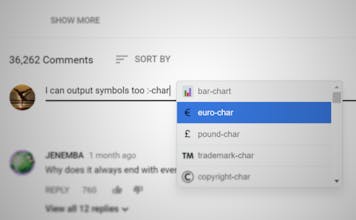
Smiley Caret for Chrome gallery image
Launch Team
Framer
Framer
Launch websites with enterprise needs at startup speeds.
Promoted

What do you think? …

Hristiyan Dodov
Hello! 👋 This is what I’ve been working on lately. A Chrome Extension that offers the easiest way to write emoji. Huge thanks to Arun for taking the time to hunt it! 🙌 Free, no ads. Made by someone frustrated with searching, copying and pasting smiley faces. Intended for similar people. I have many ideas for useful features and I would love to hear feedback on what you’d want to see! If there are enough users, I could open the data to everybody so we could collectively decide on what’s the best and quickest way to write tiny faces and kittens! 🐱 Hope you find this useful and please, tell me what you think! 🙂
Arun
Hunter
I have always tried multiple emoji apps and have never been satisfied with any. I have tried the native emoji palette on Mac, but have found it to be slow at times. Rocket for Mac wasn't up to the mark either. Smiley Caret is definitely fast. Works only on Google Chrome, but that's okay. Check it out, you will love it! 😀
Vic
I'm getting square boxes 🙁 instead of emojis. A few codes are getting converted into empticons, like 😎 and not emojis.
Hristiyan Dodov
@vicky_buddie hmm, that’s strange. It highly depends on where exactly you’re typing. The field you’re putting emoji in might use a different font that struggles with them. Can you tell me which emoji are converted and which - not? I’ll keep that in mind when I enter bugfixing mode though! Thanks a lot! 👍
Vic
@hristiyandodov So far, I found conversion to emoji is working only in Twitter. It's not converting to emojis in producthunt reply box, in Reddit, Google+, GMail etc. Smile - 🙂 , Sad - 🙁 , Tongue out - 😛 , eye roll - 🙄 , all of these are giving square boxes. Heart - ❤️ , Cool guy - 😎 is giving the emoticons. Note - On a Windows 10 machine, I can use Win+. key combo to pull up emoji keyboard and place emojis in most of the above mentioned places. So, it's not that they don't support emojis.
Hristiyan Dodov
@vicky_buddie Hmmm... I have tested it in those exact same websites. The fact you’re getting black boxes is a sign that conversion actually happens. My guess is that your machine simply can’t visualize emoji for some reason. The reason it works on Twitter is because it detects when you’ve typed an emoji and immediately replaces it with an image served by Twitter. The emoji you often see (like this one 😀 and that one 😮) are simple characters like `a`, `b`, `3`, `#` and so on. It’s up to your browser to interpret them and visualize them in some way. What Twitter does is it detects those emoji characters and replaces them with an emoji *image*. By image I mean a file like JPG, PNG... the Twitter emoji are PNG. You are able to see the them because unlike certain characters, your machine has no problem visualizing PNG. That’s my theory. Also, what version of Chrome are you using? And can you see other people’s emoji? 🤔
Vic
@hristiyandodov Thanks for the detailed explanation. And I have an update. My two comments earlier were based on using the extension on a Windows 7 machine, running Chrome 63.0.3239.132 (Official Build) (64-bit). Now when I see this same thread on a Windows 10 machine running same chrome, I am able to see all Emojis - not square boxes, not emoticons; full on emojis. So, yayy!! 🎉 So, Windows 7 doesn't have emoji support?
Hristiyan Dodov
@vicky_buddie Cool that it works on Windows 10! 🎉 Take a look at this https://superuser.com/questions/... Apparently, the "Segoe UI" font used to render emoji has been added somewhere in the Windows 7 versions. Perhaps you are using a bit earlier one that doesn’t have it yet? 🤔
Colin Jones
This is great!! 🎊 I've been looking for a replacement for ctrl - command - space forever and always loved 😍 the slack experience where a colon engages an emoji search.
Hristiyan Dodov
@ctothejones Thanks a lot! 🙌 I’m planning on making it even better - like a functionality to add your own custom shortcodes (emoticon-emoji pairs). This way, you can map your favorite emoji to a few characters for ultra quick speed. ⚡ Also, Slack was my main inspiration! 😛
Phil Bagdasarian
Oh neat! You should make this a system-wide app for macOS
Hristiyan Dodov
@phil_bagdasarian I’d love to, but I think I won’t be able. I have zero experience with that sort of development and I’ve never even owned an Apple device. 😅
Mark Justin Harvey
Thank you for trying to solve this problem of emoticons poisoning people's online experience. I found taking the time to set text replacement shortcuts in iOS, which carry over to Mac, to be good but almost nobody will take the 10 minutes to do it. Keep at it 👍
Arun
Hunter

I have always tried multiple emoji apps and have never been satisfied with any. I have tried the native emoji palette on Mac, but have found it to be slow at times. Rocket for Mac wasn't up to the mark either. Smiley Caret is definitely fast and is my most favorite now.

Pros:

Blazing fast expansion and automatically converts emoticons. Not necessary to use colon notation

Cons:

Does not support keyboard navigation for suggested options when using colon notation. But, the maker has a valid technical reason behind it.

12
Next
Last