Launched this week

Smart Plan Manager
Run recurring-customer operations from one clear console
9 followers
Run recurring-customer operations from one clear console
9 followers
Smart Plan Manager brings customer status, plan context, subscriber-access settings, and billing exceptions into one focused workspace connected to Stripe.

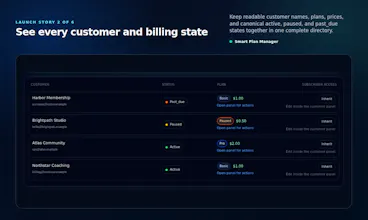


I built Smart Plan Manager after seeing small recurring-revenue businesses lose time switching between billing records, customer notes, spreadsheets, and one-off support steps.
Smart Plan Manager brings the operating picture into one place: a customer directory, clear subscription status, plan context, subscriber self-service controls, and visible billing exceptions.
I kept this first release intentionally focused on making everyday Stripe subscription management clearer and easier for small service businesses.
I’d especially appreciate feedback on:
whether customer and subscription states are immediately understandable;
which subscriber self-service controls would be most useful day to day;
what information you would want to see first on the operator dashboard.
Would love to see a timeline view that shows when a customer's plan changes, exceptions, or billing notes happen — so support can quickly catch patterns before escalating to engineering.
@zafer173643 Thanks, Zafer. That’s a useful workflow. A chronological customer activity view for plan changes, billing exceptions, and operator notes could make support handoffs much faster. We’re keeping the initial release focused, but this is a strong candidate for a future operator-visibility improvement.
Finally tried Smart Plan Manager after hearing about it on a thread, and the unified view of subscriber status and billing exceptions actually cut my support ticket time in half. The Stripe integration feels genuinely native rather than bolted on.
@nesrinkulanay Thanks for the feedback, Nesrin. Could you share which part of Smart Plan Manager you tried and how you accessed it? We’d like to understand the workflow behind your experience accurately.