
Slide Catcher Pro
Stop re-watching. Extract the slides you need.
2 followers
Stop re-watching. Extract the slides you need.
2 followers
Slide Catcher Pro extracts slide frames from video recordings into a clean PDF — no more scrubbing through long recordings to find one slide. Unlike cloud tools, it runs 100% locally on your Mac. No uploads, no file size limits, no credits. Set a time range to extract a specific portion, crop to exclude webcam overlays, and adjust duplicate detection. Re-extract as many times as you want. No account, no watermarks.
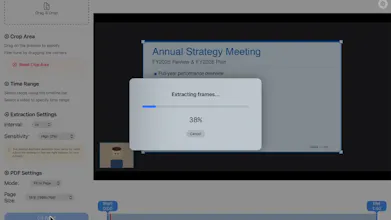


👋 Hi PH! I built Slide Catcher Pro, a Mac app that extracts slides from video recordings so you can review lectures later. I made it because reviewing a 60–90 minute lecture recording usually means pausing → screenshot → crop → repeat for every slide. For a long recording, that easily took another 30 minutes of tedious work.
So I built Slide Catcher Pro — a Mac app that extracts slides from video recordings and turns them into a reviewable PDF.
How it works:
• Drop in a video file (Zoom recordings, training videos, screen captures)
• Select the slide area — and optionally narrow the time range
• The app automatically extracts frames and removes duplicates
• Browse results, pick the ones you want
• Export as a clean PDF
Privacy & usage note:
Slide Catcher Pro runs 100% locally — your files never leave your Mac. It’s designed for personal review and note-making from recordings you’re authorized to use, not for downloading or redistributing content.
Great for:
→ Turning a 90-minute lecture recording into reviewable notes
→ Creating quick-reference material from a conference talk
→ Extracting key diagrams from your own screen recordings
→ Building handouts from workshops you host
I’d genuinely love to hear your feedback — and if you’ve ever dealt with the same problem, I’d be curious to know how you handled it.