
Skud
Menubar file delivery with your brand and tracking
43 followers
Menubar file delivery with your brand and tracking
43 followers
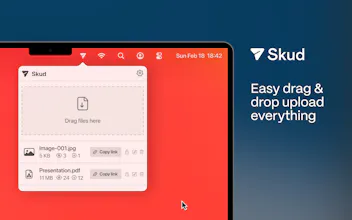
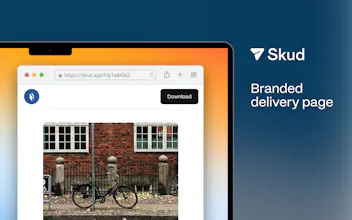
Skud lives in your Mac menubar. Drop any file → uploads, copies a branded link, tracks who opens it. Custom brand (logo, colour, cover image), password protection, expiration control. Free for 1 GB deliveries. Built for designers and studios who want ownership.

Free Options
Launch Team

Kindred ContentElevating the best in humanity.
Promoted
Hey Product Hunt 👋
Skud is a small macOS app I built because I was tired of two things:
1. Sending clients a WeTransfer link and then losing every trace of whether they opened it, downloaded it, or forgot about it.
2. WeTransfer's brand on files I made. Every delivery should feel like it's from *my* studio, not an ad for someone else's.
So Skud lives in your menubar. Drag any file onto the icon → it uploads, copies a link with your logo/colour on it, and tells you when it lands. That's the whole thing.
Free forever for 1 GB deliveries; Pro tiers unlock 100 GB / 1 TB / 2 TB, custom cover images, password protection, and detailed view analytics.
Everything I built into it is stuff I actually needed as a designer. If you're a freelancer or agency shipping files to
clients, I'd love your take.
Notarized DMG (no App Store, no in-app purchases, no telemetry you didn't opt into): https://skud.app
Happy to answer anything. And thanks to whoever brings the snacks.
V.
The WeTransfer black hole is real, I've re-sent files twice because I couldn't tell. Does the tracking show downloads or just opens?
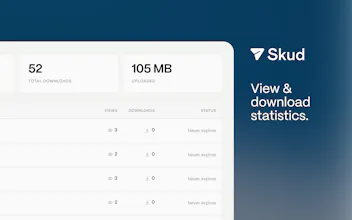
@yelyzaveta_kibets Yeah — both, separately. Every delivery has view + download counters side by side, plus a per-day chart. That "did they actually GET the file or just click the link" gap was literally why I started building it : )
@volkanolmez Separating view from download is the bit that matters, they mean completely different things. Makes sense that's where the idea started.
The drag-to-menubar flow is exactly what makes this feel lightweight. Drop the file, get the branded link immediately, and still know whether the client actually opened it instead of sending into a black box. The studio branding is a nice touch too. Does the tracking distinguish between a link view and the actual file download?
@alpertayfurr Thanks 🙏 Views and downloads are separate counters on every delivery — plus per-country and per-device breakdowns if you want to drill down. "Opened the link but didn't download" and "never opened it" are two very different signals, and that distinction was the whole reason I built the tracking side.
@volkanolmez That distinction makes a lot of sense. Opened but didn’t download is actually a useful follow-up signal, especially for proposals or client deliverables. The country/device breakdown is a nice extra layer too.
the WeTransfer black hole complaint is real, I've re-sent the same file to a client twice not knowing if the first link even got opened. quick question on the password protection piece - does a recipient need to make an account or install anything to open a protected link, or is it just a password prompt in the browser? that's usually the spot where "client-friendly" file tools quietly stop being client-friendly.