shenshen reads any photo — invoices, cards, screenshots, handwriting — and hands back the key information already organized. Fields in the right place, totals calculated. Low-confidence items flagged for a quick glance. No retyping, no line-by-line verification.
Hi Product Hunt! 👋
I'm the maker of shenshen. I built this because my team was losing a full workday every month to re-typing numbers out of photos — not to understanding them, to re-typing them.
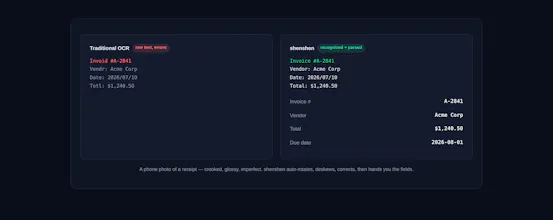
The usual OCR tools read about 70% of a real-world photo: a crooked receipt, a glossy invoice, a screenshot with moiré. Then you "edit" the other 30% by hand — which is the whole job again.
shenshen reads the photo, deskews it, corrects the errors, and hands you the fields — vendor, invoice number, line items, total. Photo in, spreadsheet row out. You review, you don't re-key.
Free to start, no card required. Try it on your messiest document: https://shenshen.ai
Happy to answer any questions about the OCR approach, the parsing engine, or pricing — AMA! 🙏
Report
Maker
Hey PH , I'm shenshenhq, and shenshen exists because I kept watching people do work that should have been done for them.
A finance lead I know spent hours every week staring at her screen, line by line, checking numbers a tool had already read off receipt photos. The tool got some right and some wrong, but she couldn't trust which was which. So she verified everything herself. The reading was automated. The checking wasn't. Her attention was still the bottleneck.
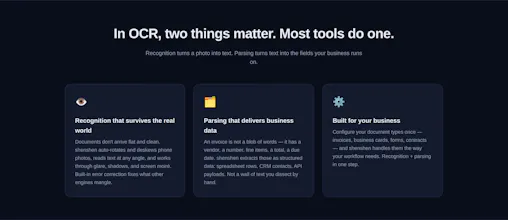
shenshen handles the whole job, and it goes well past what the tools you've used before can do. It looks at a photo the way a person would, figures out what matters, and hands it back already organized: vendor, amount, date, line items, in the right fields, totals done.
- Understands the actual photo. Crooked angles, glare, low light, pictures taken off screens, it works through all of that.
- Pulls out what matters and puts it where it belongs. Not raw text. Structured information, ready to use.
- Flags anything it isn't confident about. You glance at those, not every single field.
Setting up your own parsing flow takes about ten minutes, tell it what your team needs extracted, and it's running. For what it gives back, it pays for itself quickly.
I'd rather hear what trips it up than what you like. Drop your messiest photo and tell me where it stumbles.






Hey PH , I'm shenshenhq, and shenshen exists because I kept watching people do work that should have been done for them.
A finance lead I know spent hours every week staring at her screen, line by line, checking numbers a tool had already read off receipt photos. The tool got some right and some wrong, but she couldn't trust which was which. So she verified everything herself. The reading was automated. The checking wasn't. Her attention was still the bottleneck.
shenshen handles the whole job, and it goes well past what the tools you've used before can do. It looks at a photo the way a person would, figures out what matters, and hands it back already organized: vendor, amount, date, line items, in the right fields, totals done.
- Understands the actual photo. Crooked angles, glare, low light, pictures taken off screens, it works through all of that.
- Pulls out what matters and puts it where it belongs. Not raw text. Structured information, ready to use.
- Flags anything it isn't confident about. You glance at those, not every single field.
Setting up your own parsing flow takes about ten minutes, tell it what your team needs extracted, and it's running. For what it gives back, it pays for itself quickly.
I'd rather hear what trips it up than what you like. Drop your messiest photo and tell me where it stumbles.
— shenshenhq, building shenshen