Launching today
Search & Replace Pro for Windows

Search & Replace Pro for Windows

Easily search many files and replace the text.

1 follower

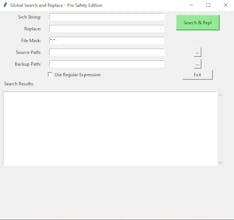
Search & Replace Utility This versatile utility eliminates the frustration of manual editing by allowing you to instantly search and replace text across thousands of files simultaneously. Supported Formats: CSV, TXT, HTML, HTM, PY, RTF, PHP, CSS, SCSS, JS, TS, JSX, TSX, PHTML, RB, CLS, TRIGGER, COMPONENT, APP, EVT, INTF, XML, PAGE, JSON, SQL, YAML, YML, INI, CONF, MD, ASP, ASPX.
Search & Replace Pro for Windows gallery image
Payment Required
Launch tags:Productivity
Launch Team / Built With
AssemblyAI
AssemblyAI
Build voice AI apps with a single API
Promoted

What do you think? …

Alison Reed
Maker
📌
WHY THIS IS A SUPERIOR TOOL COMPARED TO NOTEPAD++ 1. Zero Memory Crashes (Handling Massive Files) Notepad++ loads the entire file into your RAM to display it on the screen. If you try to open or "Replace All" on a 2GB CSV file or a massive Salesforce metadata XML, Notepad++ will often freeze, lag, or simply crash with a "File is too big" error. This Tool: Processes files as a "stream." It reads and writes data simultaneously without loading the whole file into memory, meaning it can handle a 10GB file just as easily as a 1MB one. 2. Lightning Speed vs. "Not Responding" When you hit "Replace All" in Notepad++, the program has to update its visual interface for every single match it finds. This causes the "Not Responding" spinning wheel. This Tool: Has no visual "overhead." It works entirely in the background, focusing 100% of your CPU power on the text transformation itself. What takes Notepad++ 5 minutes (if it doesn't crash) this tool can do in seconds. 3. No "Undo" Anxiety Notepad++’s "Replace in Files" feature is permanent—there is no "Undo" button once you hit it. If your Regex is slightly wrong, you can destroy thousands of files in an instant. This Tool: The "Safe Mode" (saving to a backup folder) is a built-in safety net that Notepad++ lacks. This gives developers the confidence to run complex Regex without fearing a "career-ending" mistake. 4. No Character Limits on Regex Notepad++ has a hard-coded limit of 2,046 characters for its "Find" and "Replace" fields. For developers doing complex refactoring or moving large blocks of code, this limit is a major roadblock. This Tool: Has no such limit. You can paste massive blocks of code or incredibly long Regex patterns without the software cutting you off. 5. Portability for IT Admins Notepad++ often requires installation or leaves "traces" (registry keys, config files) on a system. This Tool: Is a single, standalone .exe. An IT Admin or Salesforce Dev can keep it on a USB drive or in a "Tools" folder and run it on any machine without "installing" anything. It’s clean, lightweight, and leaves no footprint.