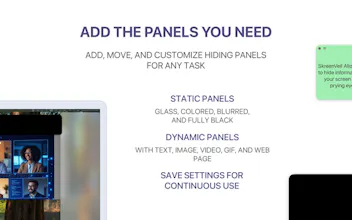
ScreenVeil helps you hide sensitive parts of your screen and place useful overlays on top of any app on macOS. It’s built for screen sharing, presentations, live streams, recordings, and everyday work when you need full control over what stays visible. You can add floating panels in seconds and save complete setups as presets. It’s a simple way to protect private information, keep notes visible, highlight content, or prepare reusable on-screen layouts for meetings and demos.
No reviews yetBe the first to leave a review for ScreenVeil
Maker
📌
Hey Product Hunt 👋
I’m the maker of ScreenVeil, a small macOS app I built because I was tired of preparing my screen before every call, demo, recording, or class.
The problem is simple: during screen sharing, there is always something you don’t want to show. A private chat, internal data, browser tabs, client info, notes, random desktop chaos. Usually the solution is to move windows around, close apps, crop the screen, or just hope nothing awkward appears.
ScreenVeil lets you place floating panels over any app and hide sensitive parts of your screen in seconds. You can use black, blur, glass, color, text, image, GIF, video, or web panels, adjust their size and transparency, and save reusable presets for recurring workflows.
I use it for product demos, teaching, presentations, and screen recordings. It’s especially useful when I need to show the right thing without turning my entire desktop into a carefully staged theater set.
I’d love to hear your feedback, questions, and use cases.
Thanks for checking out ScreenVeil.
Report
Congrats on the launch, Egor. Japan-based Mac/iOS founder here.
One Japan-specific thought: ScreenVeil could be especially relevant here because screen sharing in Japan often happens in fairly privacy-sensitive contexts: client calls, online lessons, product demos, internal meetings, and recorded tutorials.
The blocker may not be “can I hide part of my screen?” but whether users trust it enough for accidental exposure risks: LINE notifications, client names, invoices, browser tabs, personal folders, and Japanese documents.
The local angle I’d test first is not just “hide sensitive areas,” but “prepare your screen for a client call or recording in 10 seconds without moving windows around.”
Report
Maker
@wakuta Thanks a lot, this is a very useful Japan-specific angle.
You’re right: the real pain is often not just “hide this part of the screen,” but “make my screen safe before a client call, lesson, demo, or recording without rearranging everything.”
That’s exactly why I added presets to ScreenVeil. You can prepare a layout once, save it, and then launch it anytime. The saved panels instantly appear on top of your windows, so you can cover things like notifications, client names, browser tabs, folders, invoices, or notes in a few seconds.
I really like your framing around “prepare your screen for a client call or recording in 10 seconds.” That might actually be a stronger local positioning than the more general privacy message. Thank you for the thoughtful feedback.
One small Japan-specific nuance: I’d probably make the “preset” idea much more visible in the first screenshot or short demo, because “privacy tool” can sound abstract, but “one-click client-call layout” maps to a very concrete routine.
The Japanese segments I’d test first are likely online teachers/coaches recording lessons, freelancers doing client demos, and small teams handling invoices or customer data over Zoom.
For those users, the trust question is less “does blur work?” and more “can I rely on this before every call without thinking?”
We’ll definitely add this to our tests: making presets more visible, especially as a “one-click layout” rather than just an abstract privacy feature. That framing feels much easier to understand and much closer to a real routine.
I'll stop here so I don't turn your launch thread into a long consulting thread, but the preset/client-call framing is definitely the sharper Japan angle to test.
If you ever want to dig deeper into the Japan side, happy to share more — just say the word.
Right now I’m focused on collecting feedback from Mac users and making the product stronger on macOS first.
After that, I’d definitely like to explore a Windows version too. It feels like the problem is not Mac-only.
Report
Genuinely useful idea. The "blur sensitive areas during screen share" problem is one I've hacked around with awkward window arrangements for years. Will be trying this on my next client call.
Report
Maker
@oren_shadmi Thanks a lot, really glad this resonates.
That awkward window-arranging ritual before a client call is exactly the kind of thing I wanted to remove with ScreenVeil.
Would love to hear how it works for your next call, especially if anything feels clunky or missing.
Congrats on the launch, Egor. Japan-based Mac/iOS founder here.
One Japan-specific thought: ScreenVeil could be especially relevant here because screen sharing in Japan often happens in fairly privacy-sensitive contexts: client calls, online lessons, product demos, internal meetings, and recorded tutorials.
The blocker may not be “can I hide part of my screen?” but whether users trust it enough for accidental exposure risks: LINE notifications, client names, invoices, browser tabs, personal folders, and Japanese documents.
The local angle I’d test first is not just “hide sensitive areas,” but “prepare your screen for a client call or recording in 10 seconds without moving windows around.”
@wakuta Thanks a lot, this is a very useful Japan-specific angle.
You’re right: the real pain is often not just “hide this part of the screen,” but “make my screen safe before a client call, lesson, demo, or recording without rearranging everything.”
That’s exactly why I added presets to ScreenVeil. You can prepare a layout once, save it, and then launch it anytime. The saved panels instantly appear on top of your windows, so you can cover things like notifications, client names, browser tabs, folders, invoices, or notes in a few seconds.
I really like your framing around “prepare your screen for a client call or recording in 10 seconds.” That might actually be a stronger local positioning than the more general privacy message. Thank you for the thoughtful feedback.
@griva_e Thanks Egor — glad it resonated.
One small Japan-specific nuance: I’d probably make the “preset” idea much more visible in the first screenshot or short demo, because “privacy tool” can sound abstract, but “one-click client-call layout” maps to a very concrete routine.
The Japanese segments I’d test first are likely online teachers/coaches recording lessons, freelancers doing client demos, and small teams handling invoices or customer data over Zoom.
For those users, the trust question is less “does blur work?” and more “can I rely on this before every call without thinking?”
@wakuta Thanks, that’s a very good point.
We’ll definitely add this to our tests: making presets more visible, especially as a “one-click layout” rather than just an abstract privacy feature. That framing feels much easier to understand and much closer to a real routine.
@griva_e Thanks Egor — glad it helps.
I'll stop here so I don't turn your launch thread into a long consulting thread, but the preset/client-call framing is definitely the sharper Japan angle to test.
If you ever want to dig deeper into the Japan side, happy to share more — just say the word.
Wishing you a strong launch.
MUSIXQUARE
@hiefny Thanks a lot!
Right now I’m focused on collecting feedback from Mac users and making the product stronger on macOS first.
After that, I’d definitely like to explore a Windows version too. It feels like the problem is not Mac-only.
Genuinely useful idea. The "blur sensitive areas during screen share" problem is one I've hacked around with awkward window arrangements for years. Will be trying this on my next client call.
@oren_shadmi Thanks a lot, really glad this resonates.
That awkward window-arranging ritual before a client call is exactly the kind of thing I wanted to remove with ScreenVeil.
Would love to hear how it works for your next call, especially if anything feels clunky or missing.