
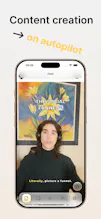
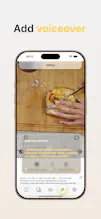
Rkive is an AI-native content creation system that edits real photos and videos from natural language. You upload or record media, describe what you want, and Rkive selects clips, crops, adds subtitles, sound effects, music, voiceover, stickers, and thumbnails, producing a finished post ready to publish. Unlike generators or templates, Rkive edits your actual media and keeps everything fully editable via prompts or manual mode. AI does the work, but you stay in control.







 CapCut
 OpusClip
 Captions
ChatPal
Very cool - can you then also edit manually to polish something or make any slight edits?
👋 Hey Product Hunt!
I’m Alberto, founder of Rkive.
I built Rkive because most “AI content tools” don’t actually edit, they generate templates or slop. I wanted an AI that could work on real photos and videos, understand intent, and stay fully editable.
Rkive lets you describe what you want and turns it into an actual edit: clips, crops, subtitles, sound effects, music, voiceover, and thumbnails... all on your actual media.
We’re early, shipping fast, and I’d love honest feedback from creators, marketers, and builders. I’ll be here all day answering questions 🙏
@alberto_luengo How does cutting and joining videos work?
This edits your videos in terms of brightness, colour, etc., but it doesn't generate videos, does it?
@jackdev21 It can extract clips from any amount of videos and arrange them in any order. And yes, it can adjust brightness, color, contrast and such stuff. It's not intended for video generation. It can generate audio effects, music, stickers, even thumbnails using some frames from your own video, but it's meant to work with real video and images.
We're planning to include video generation for effects and B-roll, not necessarily for full length artificial videos.
@alberto_luengo How do I create subtitles? Are they generated automatically, or do I have to do it manually?
@alberto_luengo Love the idea