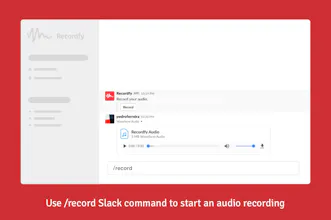
Recordfy is the easiest way to send audio messages directly on Slack. Simply use /record slash command to start recording your audio. No external integration needed! When you're finished, your audio is uploaded to your Slack channel or direct message as an attachment.
Hi 👋 Product Hunt!
Recordfy is a simple tool that enables you to send audio messages directly on Slack. You can send it directly to team members or channels.
You also have the option to send Speech-to-Text transcription (powered by Google Cloud Platform) with your audio. Why is this awesome?
- not everyone likes listening to audio messages (or might not be in a place where it's possible);
- text messages are searchable, so you can easily find an audio message later;
⚡️ How does it work?
After installing Recordfy on your Slack workspace, you can start an audio recording by using the /record slash command. Audio messages are uploaded to your chat (as an attachment) and can be played directly on Slack.
If you enable Speech-to-Text, the transcription will be sent as a reply to your audio message.
🗄 Where are the audios stored?
In your own Slack workspace, so you have full control.
Looking forward to your feedback!
Report
Amazing tool! \o/
Pros:
Super easy to install and use.
Cons:
I can't record inside Slack app.
Report
Reviews
No reviews yetBe the first to leave a review for Recordfy


Recordfy
Amazing tool! \o/
Pros:Super easy to install and use.
Cons:I can't record inside Slack app.