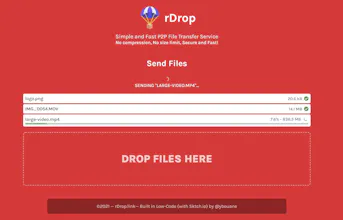
Send files from one device to another by scanning a QR code. No compression, No size limit, Secure and Fast! Like AirDrop, but works on any device, OS or platform!
No reviews yetBe the first to leave a review for rDrop
Love your product.. Thanks!
does this also work asynchronously? (By the way: There is a typo in the product name on Producthunt)
Report
rDop -> rDrop
Report
Maker
@robin_schaerer For the transfer to occur, both devices need to be on the same network and the webapp must be open. Those are limitation of WebRTC P2P and hopefully browsers will improve in the future to allow more flexibility.
Report
Maker
Hey Hunters 👋!
This year I'll be building 10 products/businesses in public and this is project #2 (project #1 is on hold while it's awaiting reviewal in a marketplace)!
rDrop : Like AirDrop but for any Device, any OS, any Platform.
So first, let's talk about why this is useful. Let me ask you a question:
I have a 4K video that I took on my iPhone and I want to send it to my Windows Desktop for editing. How do I do that?
🕺: Send it to yourself through Messenger, it's like two clicks.
🤵♂️: Messenger compresses videos and photos, I want the full quality uncompressed version of my video.
🕺: Alright, then send it by email it doesn't compress the files.
🤵♂️: Really? Have you ever tried sending a file larger than 25MB by email?
🕺: Upload it on DropBox or Drive and then download it on your computer.
🤵♂️: Sure, that's already a better option. But! I'm a little lazy (the process is not very quick, I mean I just want to send a file), my Drive only has 1GB left and I hate to upload random stuff on my drive and have stuff laying around...
🕺: Ok... What about WeTransfer?
🤵♂️: Yes, and it's great! The downside is that I prefer to not have my files handled by third parties like that. Also, I said I'm lazy, I don't want to upload the file, then retrieve the download link and download it on the other device. Do you have something simpler?
This is the problem rDrop attempts to solve.
It's a super simple File Transfer Service.
1) Open rDrop.link on both devices.
2) Select the files you want to transfer.
3) Scan the QR Code or just Copy the 6-letter code
4) That's it, the transfer starts and you can download your files!
How it's built
This tool was entirely built under 5 days! That is thanks to the power of Sktch.io a No-Code/Low-Code builder that makes building this kind of projects extremely easy and efficient. (disclaimer: I made Sktch.io)
The tool also uses the WebRTC API for the P2P File transfer.
Let me know your thoughts about it, I'll be grateful for any feedback!
To stay up to date on the advancement of my next projects, feel free to follow me on Twitter at @ybouane
Report
This is awesome! I encounter this a lot with 'to edit' files where I may want to work on it on my tablet or have already done that on PC and need to share it more quickly. Running out of space on my GDrive and syncing a lot of unnecessary files is annoying too!
I was skeptical at first because a lot of tools who claim to be p2p are mostly gimmickish....but after trying it out, I must say great job at this. I am replacing Snapdrop with this for mobile to PC or home to office transfers.
Report
Maker
@sulemanelahi2 I’m happy to hear that! That’s the use case I was trying to solve!
Report
May I know if this is like WeTransfer or is it something better?
Report
Maker
@stanleyleeansyah To use WeTransfer, you must upload the files on their server, send the download link and then download on the receiving device.
For rDrop the file is sent directly from one device to the other, your file is not handled by any third party server.
It can be faster since transfering through the local network is faster than uploading to an external server.
The process is also simpler due to the qrcode scanning.