Propstar for Figma

Propstar for Figma

Generate instance tables for your Figma components

82 followers

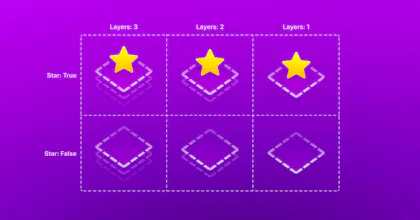
Generate all possible instances for your components on Figma, including every combination of variants and component properties, all in a tidy labelled table.
Propstar for Figma gallery image
Free
Launch Team
Intercom
Intercom
Startups get 90% off Intercom + 1 year of Fin AI Agent free
Promoted

What do you think? …

Chris Messina
This is so useful — was just doing this by hand the other day. Thanks @gusso!
Henrique Gusso
Hi, hello! I'm Gusso, I work with design tooling at Wise, where we're constantly trying to make sure our designers are not spending time doing things that a robot could do better. When Figma released component properties in May, I saw many design system maintainers on Twitter concerned that many of the possible instances weren't going to be visible in the canvas anymore. This could lead to uncaught layout bugs because we no longer have a bird's-eye view of the component. We had the same concern, so this felt like the time to create Propstar. The goal was to create a plugin that tackled most of our organisation problems with components: ⬥ Generating every possible permutation ⬥ Creating labels for every property value ⬥ Aligning variants on our component sets ⬥ Running with one command, no config needed For Propstar to be easily understood and hopefully feel a little bit magical, it needed to do the heavy lifting on decision-making. Distributing properties across both axes, deciding which labels to show, which styles to use, those are all things I aimed to be as wide-encompassing as possible so we could get away for something like this to have no settings and be useful in many systems. I did just release our first customisation, a way to create a standalone instance table next to your main component, as well as keeping the option to embed it in your main component. This was in the form of a new menu command, so you can still rerun Propstar across many components using the ⌥⌘P shortcut and keep it easy to use. We definitely want to keep evolving this to be useful in many situations, so please let me know how you are using it and what you like for Propstar to be able to do next. I'm currently looking into how I can solve 2 of the most requested features so far: sorting and optionally excluding boolean properties. Thank you @chrismessina for hunting this, @millonestarde for all the help in shaping it, and Dan (https://twitter.com/mancdan) for baptising it.
Ilker Guller
This looks pretty useful, @gusso! It can be very helpful for the design system team while we are working on rebranding and DS UI. Is there any possibility of a control mechanism for a specific component? For example, I would like to exclude or hide some variants of some components when needed.
Henrique Gusso
@the_bluescreen HEY İLKER! You could already unlock and manipulate the table to manually delete some instances, or do you mean excluding a whole row or column with a specific property value? It would be good to know if this is what you're looking for, I can think of a way of squeezing this in without bloating things too much.
Steven Houessou-adin
J'adore. Great work, so helpful.
Pg Gonni
Such a great plugin and honestly a must have if you do anything design systems related. Ive been using it since I discovered it and I can never go back!
Karim Saif
AWESOME✨
Adam Fox
this is super helpful @gusso! would love for an option to show the label of the variant in the same way property labels are displayed. e.g. - “State: Hover”.
Henrique Gusso
@faxmado Hey Adam! To simplify configuration, I went with showing labels only for boolean and numeric values, which are usually the ones that don't make sense on their own. But variants with those types of values do also show their labels. Would you mind letting me know an example of property where the value doesn't make sense on its own?
Adam Fox
@gusso ah, yeah that's fair. honestly, on my end it could just be an adjustment of the naming convention but thought it would be nice if we could toggle something like that on and off. in my particular use case i have a variant setup for displaying icons in a button (could totally be a boolean but i want the end user to be able to select either no icon, left icon or right icon, but not both left and right). so, at present i have: "ShowIcon: None, Left, Right". by simply renaming that to something like "ShowIcon: No Icon, Left Icon, Right Icon" it solves the problem but again, just thought it could be nice to have that option.
12
Next
Last