
Premium Favicon
A modern favicon generator, supports extraction from logo
9 followers
A modern favicon generator, supports extraction from logo
9 followers
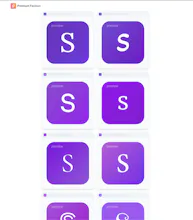
Premium Favicon stands out by how it creates favicons, not just what it exports. Its logo-to-favicon mode intelligently isolates the most recognizable and distinctive part of a logo and extracts it into a favicon. The character mode lets you generate clean, brand-colored favicons from initials or text, perfect for early-stage websites that just want a quick and simple favicon to get started.

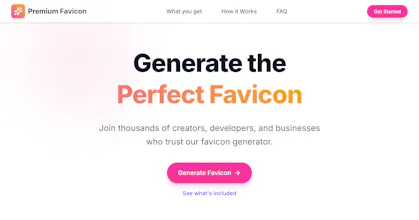


Premium Favicon started from a problem I personally ran into. I was cloning an existing website to launch a new variation with a different name and branding, and the very last step was replacing the favicon. I assumed this would be quick, but when I searched for favicon generators on Google, every top result was unfit for purpose.
They were basically just fancy image converters. You upload an image and get a .ico converted version of the same image back. That assumes you already have a favicon-ready image, which isn’t the case for most people. Not only their tool, but even their website looked and felt outdated - a reflection of just how little the problem had evolved.
More importantly, it assumes that any logo automatically works as a favicon, which is rarely true. A favicon typically sits as a tiny icon in a browser tab, so it needs to be recognizable at a very small size. Most logos aren’t designed for this. That’s why companies like Google use just the letter “G” or Amazon uses just the letter “a” for their favicons.
What I actually wanted was a smart tool that could take an existing logo and intelligently extract the most recognizable and distinctive element from it, like an icon or the first letter, and give you back something that truly works at favicon size. Not just a single .ico file either, but a complete favicon zip containing all the optimized formats needed for every browser and device.
That idea became the foundation of Premium Favicon’s logo mode.
To get anything close to this experience with existing tools, you’d need to subscribe to an AI image generator, keep prompting it until you got something usable, then run the result through a converter. It felt unnecessarily manual, fragmented, and dated. It seemed obvious that all of these moving parts could be stitched into one clean and modern experience. I'm a sucker for solutions that are just a few clicks and problem solved.
As I kept building, I realized there was another major gap. Many early-stage founders or side-project builders don’t have a logo yet, but still want something fast, simple, and suitable. They just want to ship. That led to character mode. Type in a character or the initials of your company name, choose brand colors, and instantly get multiple contemporary, modern-looking favicon options you can pick from.
That’s how the two modes were born. Logo-to-favicon for intelligent extraction, and character-based generation for speed, both designed to remove friction and make favicon creation a few-click experience.