📷 put a floating video image of yourself on your desktop 🎙 get and share your own subtitles ⭐️ be the hero in your video conferences and screen recordings 🚫 no download necessary
Hey everyone! I’m Jakob, founder and one of the makers of pipfy which we created in our friendly little innovation lab at pixelcraft. Usually occupied with developing strategy tools and templates that make working with information more fun and functional, we are a small team that’s been working remotely for years. That means presentations, barcamps, coffee chitchats—all in front of a screen.
But finally, after all these years, we realized something: We need a tool that helps everyone understand each other better—or at all.
Faceless presentations, patchy acoustics and hard to follow speeches just didn’t cut it for us anymore.
First of all, we wanted to make sure you can see a face. Not just because we need that smile but communicating with facial expressions or sign language makes you so much easier to follow.
Then we wanted to make sure that we are understood right—even by people who can’t hear—so we made live subtitles to include everybody.
The fact that these functions make live conferences and asynchronous videos of your desktop (for a tutorial or a presentation for your colleagues which they can use anytime) so much more accessible made us realize that we needed to make our tool public.
Free and open source, of course.
Pipfy works directly in your browser. So without any installation it comes with two main functions:
📷 pipfy.webcam: You can put a video image of yourself on your desktop in front of other active windows like a running presentation. Perfect for screen recording and screen sharing in video conferencing software. You get direct access to your camera image, crop it and arrange as you like and need.
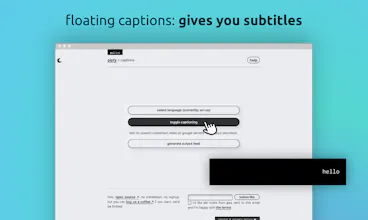
🎙 pipfy.captions: While using the google chrome browser you can create a captioning feed of your audio input. This floating subtitle bar hovers over active windows on your desktop and serves you with live subtitles.
We are constantly working on improvements for pipfy, so we’d love to get some feedback and ideas for potential use cases and what kind of features you would like to see in the future.
In short: Any ideas, complaints and observations—we are keen to hear.
@thebeardedgeek4 Hi! When you are running pipfy, you can select the webcam you want to use in your browser. So you can choose between a built-in webcam or an external device.
If you want to use your mobile device for your video feed, you need to find a way to have your mobile device recognized as a webcam. There are apps and tricks for that out there, depending on the devices you use.




pipfy
pipfy
findable.