Launched this week
PDF Auditor

PDF Auditor

Inspect PDF internals & analyze security risks on macOS

2 followers

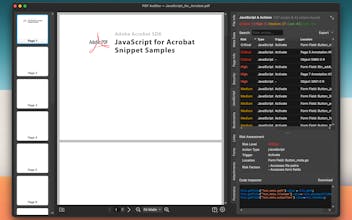
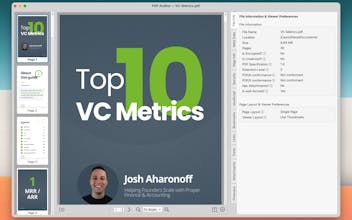
macOS Preview is great for reading PDFs, but terrible for debugging them. If you are a developer, QA engineer, or security analyst, you know the pain: why is this PDF 50MB? Why is the font rendering wrong? Is there malicious JavaScript hidden inside? PDF Auditor is a privacy first app built to answer these questions. It doesn't just display the document; it exposes the internal structure. Features: 🕵️‍♂️ Forensic Analysis ⚠️ JavaScript Inspection 📎 See Attachments 🔠 Embedded Fonts etc.
PDF Auditor gallery image
Free Options
Launch Team
Turbotic Automation AI
Build powerful automations without code. 1 Month Free!
Promoted

What do you think? …

Pura Vida Software
Hi Product Hunt! 👋 I'm the maker of PDF Auditor. I built this tool because I was tired of guessing why my generated PDFs were breaking. Existing tools were either expensive enterprise suites (Acrobat Pro) or slow Java-based apps. I wanted something that felt like it belonged on a Mac. PDF Auditor lets you see "under the hood" of any PDF file. My favorite use cases: • Security: Checking if a PDF contains hidden scripts or tracking beacons. • Devs: Debugging PDF generation libraries (checking if your font subsetting actually worked). • Designers: Seeing exactly which color space (CMYK vs RGB) is being used on a specific page. I’m actively adding features, so if you spot a missing metadata field or a structure type I don't handle yet, let me know below! It's 100% Free for the launch, so give it a spin. 🚀