
OneShots
OneShots - 10s create amazing APP screenshots
53 followers
OneShots - 10s create amazing APP screenshots
53 followers
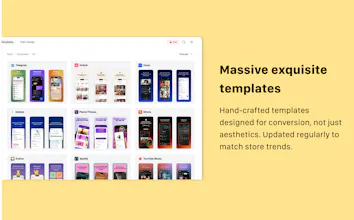
OneShots is the fastest way to turn your app screenshots into store-ready marketing visuals. Upload raw screenshots, pick a template, customize text and branding — then export all device sizes and all languages in 10 seconds. Why you'll love it: ⚡ 10 seconds, not "in minutes" 🎯 One edit, everywhere 📱 Built for app stores 🌍 Multi-language ready 📦 Bulk HD export 🎨 Templates that convert No Figma. No freelancers. No manual resizing. 👉 Try OneShots free today — https://oneshots.cc



The 'change one headline and it syncs everywhere' bit is what actually kills the Figma-resize loop for me — more than the templates, that's the real day-one win. When I come back weeks later for a v2 update, does OneShots keep my branding and template as a reusable project, or am I re-uploading and re-styling from scratch each launch? And for the multi-language export, does it pull from my own translation file, or do I type each locale's copy in by hand?
@leo404 You can save templates of your own brand's unique features, and when your product needs to be updated and released in the next version, you can take them directly without having to start designing again every time;
In addition, multilingual export automatically captures translations based on the text you enter, without the need to manually enter text in multiple regional languages;
Saved brand templates carrying across versions is exactly what makes this stick for repeat launches, thanks for clarifying. On the auto-captured translations: if a headline comes out slightly off for one locale, can I review and override that single string before export, or is it all-or-nothing per language?
@leo404 You can review the text in each language version of the region for accuracy before exporting
Does it actually pull the screenshots from the App Store / Play Store connect directly, or do I need to upload them by hand every time I update a build?
@fatmanurhuer You need to upload screenshots of your app to quickly generate app images that comply with the standards of the App Store and Play Store with just one click
how does it handle the different safe area and notch layouts when exporting across iphone and android sizes in one batch?
@anlkmc6 You can save templates of different sizes for Apple and Android devices and export them in batches. Of course, saving templates for different devices only requires a simple switch in canvas size, which is easy to do in 3 seconds
One of the small but painful parts of shipping apps is how much time gets lost on screenshots.
It sounds simple at first, but once you need different devices, multiple screen sizes, localized copy, consistent branding, and clean exports, it quickly becomes a full design task.
That’s the problem OneShots is trying to remove.
Instead of manually building every screenshot set, you can start from conversion-focused templates, customize the content, and export everything in the right formats for app stores.
What I like most about this direction is that it is not trying to replace designers. It is helping founders and teams move faster when they just need professional, store-ready screenshots without repeating the same work again and again.
Excited to keep improving the templates, export flow, and localization support based on feedback from the Product Hunt community
@tomliang123 I'm glad to create the best tool product experience together
Hi Product Hunt!
I built OneShots because creating app store screenshots always felt much harder than it should be.
For every launch or update, I had to open a design tool, adjust layouts for different devices, rewrite copy for multiple markets, export everything, check the dimensions, and then do it all again when one small line changed.
OneShots turns that workflow into something much simpler: upload your screenshots, choose a template, edit your copy and branding, then export store-ready assets in bulk.
A few things I focused on:
Fast screenshot generation without starting from a blank canvas
Templates made specifically for App Store and Google Play listings
One-place editing for copy, branding, and visual style
Multi-device exports without manually resizing every screen
High-quality PNG/JPG exports packed and ready to upload
The goal is simple: help indie developers, small teams, and app marketers create polished store screenshots without spending hours in design tools.
Would love to hear your feedback and ideas for what we should improve next.
@callmeye I really hope to hear everyone's feedback and suggestions so that we can make improvements in the future.
Uploaded a handful of iOS screenshots and had localized Play Store images ready before my coffee cooled down. The bulk export is genuinely the part that saved me tonight.
@hasanbump Yes, using onesshots can save a lot of time, and the effect of generating app screenshots is really good. Let me give you more feedback