On Air

On Air

Control your smart devices when an event occurs on your Mac

1 follower

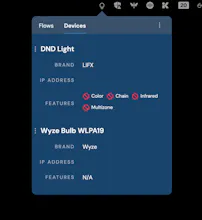
On Air is a Mac menubar app that controls your smart devices when an event occurs. Useful for those working from home! Currently, the app supports: Devices: LIFX bulbs & Wyze bulbs Actions: When the camera turns on & When you're in a meeting
On Air gallery image
Payment Required
Launch Team
Tines
Tines
The intelligent workflow platform
Promoted

What do you think? …

Damon Bauer
Backstory: I started working from home in July of 2020. I've got two small children at home, so I was looking for an easy way for them to know that I can't be interrupted during meetings. I built this app so that while I'm on a video call, a WiFi light bulb turns on outside of my office. Now, my kids know if the light is on, I can't be interrupted. --- I'm not trying to rebuild IFTTT or anything here - it's intentionally simple! I hope to gain support so I can add other devices (such as Philips Hue bulbs). I've also got feature ideas that I think would be interesting, such as "configure a bulb with colors/options".
Chris Messina
@damonbauer pretty cool...! One step further would be to create scenes... so one that I would probably use would be "Livestreaming", and it would turn on my ring light, my bar light, set my LIFX bulb to a particular setting, pause all my music, and launch a couple apps that I use. WDYT?
Damon Bauer
@chrismessina Thanks a bunch for the feedback! I can absolutely see some powerful use cases like you've described. I'm going to take some time to figure out how I can step my way toward that sort of automation. Thanks again 🙏
Vivek
Very useful product, especially for WFH situation.
Damon Bauer
Thanks Vivek!!
Brian Roach
Love this! Works super well!
Damon Bauer
Update: I've released a new version of the app that allows you to run an event when "Do Not Disturb" is active. There are now three "triggers" that the app will turn on/off a device in response to: 1. When "Do Not Disturb" is active 2. When the camera turns on 3. When you're in a meeting I hope you check it out!
Damon Bauer
Update: JUST RELEASED: Update: I've released a new version of the app that allows you to control your Philips Hue bulbs, via a Hue Bridge. This is the most significant update I've done of the app so far, and it's one I'm very excited about! The vast majority of users I spoke with use Philips Hue bulbs, so this is a step in the right direction for supporting a larger number of users. I hope you check it out!