
oMLX
Mac LLM server that cuts agent wait times from 90s to 5s
84 followers
Mac LLM server that cuts agent wait times from 90s to 5s
84 followers
oMLX turns your Mac into a full LLM inference server, run from the menu bar. It serves text, vision, OCR, embedding and reranker models with continuous batching, plus a RAM+SSD tiered KV cache that survives restarts, so Claude Code and Cursor respond in about 5s instead of 90s. OpenAI and Anthropic compatible APIs drop straight in. Native Swift, not Electron. Apache 2.0, open source.



@rabnoor_s I guess some of the more tech descriptions are hard for me to fully grasp, but I definitely caught the idea of a local AI server and cutting response time down to 5s instead of 90s =D
Sounds great!
Congrats on the launch, and lots of success.
@adana thats genuinely useful and not a small thing, the description is too technical and i wrote it, so thats on me. the plain version: normally when you ask a model on your own machine a follow up, it re reads the whole conversation from the beginning before it answers, and that is where the ninety seconds goes. this keeps that reading saved on disk, so the follow up comes back almost immediately. the part that might actually matter for a studio like yours is less the speed and more that it all runs on your own machine. nothing you feed it leaves the building, which for unreleased creative work is usually the real blocker rather than how fast it answers.
@rabnoor_s Wow, really cool! Thanks for the version I could understand =)
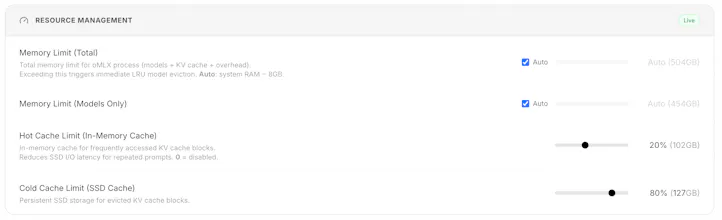
Cache surviving a restart is the detail I'd have skipped and then regretted. How much SSD does the tiered cache use in practice?
@yelyzaveta_kibets honest answer, i dont have a measured number from my own runs so i wont invent one. the shape of it though: kv cache scales with context length times model size, so a long agent session on a mid sized model is gigabytes rather than megabytes, which is exactly why moving it to ssd is the interesting bit. ram fills up and you end up throwing away context you already paid to compute. the thing id actually watch is not the size but whether it evicts sensibly once the disk fills, because that is usually where these get unpleasant.
@rabnoor_s Rather have the shape than a made-up number, thanks for saying so. Context length times model size is enough to size a disk against.
@yelyzaveta_kibets that sizing rule holds right up until you keep more than one model loaded, which is where mine fell over. two at once and it stops being one multiplication and turns into a budget you have to actively manage.
@rabnoor_s Two models loaded at once turning it into a budget you manage is the part I'd have missed. That's a useful cliff to know about.
@yelyzaveta_kibets the thing that makes it a cliff rather than a slope is that nothing tells you. it just gets slower, and slower reads as the model being bad rather than the machine being full. the tell, if you ever hit it, is that time to first token goes long while tokens per second stays fine.
@rabnoor_s Not yet, no. Adding it to my list, since most of what I learn about local setups comes from threads exactly like this one.
Recently got my Mac that has enough RAM to run local LLMs and honestly – oMLX was the best solution so far to optimize for context and speed at the same time on Apple silicon. Also huge shoutout to the devs, who are constantly shipping updates at a crazy pace. Love to see it on PH, thanks for hunting!
@dmtsepelev thats the exact use i hunted it for, so its good to hear it from someone actually running it. the interesting bit in what you wrote is that you framed it as finally having enough ram, because the ssd tier is the thing that stops ram being the ceiling at all. you end up limited by disk you can spare rather than memory you had to buy up front. agreed on jun too. the commit history is relentless and his show hn barely got seen, which is most of why i wanted this on the board.
@rabnoor_s yep, but SSD has very low bandwidth compared with RAM, so it helps a little bit, but it does not replace RAM. having 48GB is still the bare minimum to run anything decent for coding (and still its veeery tight)
The number that would sell me isn't 90 to 5, it's what happens when the cache is wrong. A KV cache that survives a restart also survives me swapping the model or editing the system prompt, and a stale prefix doesn't crash, it just answers a slightly different question than the one on screen. If the cache key includes the model hash and the full prefix, put that on the page, because that's the thing a dev has to trust before leaving it running for a week. Tiered RAM plus SSD is the right shape though, most local setups throw the whole thing away and pretend prefill is free.
my stack right now is just LM Studio for casual local chat, which never bothered me because that's a one-off question and answer. the thing that actually annoyed me was agent coding loops - watching Claude Code re-read the whole conversation on every follow-up turn. that's a different use case than most "run a model locally" tools are built for, so the KV cache surviving a restart is the part that's actually interesting here, more than raw tokens/sec.