
Launching today

ObitoX
Stop Fighting File Uploads. Start Shipping.
19 followers
Stop Fighting File Uploads. Start Shipping.
19 followers
ObitoX is a universal file upload SDK that solves the top 5 developer pain points: CORS configuration (2-4 hours saved), file validation security, slow multi-file uploads, network aware expiry, and automatic webhooks. One API for S3, Supabase, Uploadcare, Much much more!!!.




Hey Product Hunt! 👋
I'm MemoNotSafe, and after almost a year of fighting file upload hell, I finally built the solution: ObitoX.
The Problem I Solved
Ever spent 4 hours debugging CORS errors?
Ever had uploads fail on slow networks?
Ever made 20 API calls just to upload 20 files?
Yeah, me too. So I built ObitoX.
What Makes It Different
🔥 Auto CORS Configuration - 30 seconds instead of 4 hours
⚡ 18x Faster Batch Uploads - 20 files in 0.7s (was 13s)
🛡️ Magic Bytes Validation - Prevents file type spoofing
📡 Smart Expiry - Auto-adjusts for slow networks
🪝 Production Webhooks - Enterprise-grade retry logic
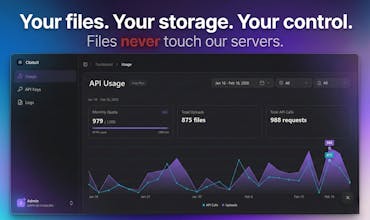
🔒 Privacy-First Architecture - Files never touch our servers
Your files upload directly from users to your storage provider (S3, Supabase, Uploadcare, etc...).
ObitoX never sees your files. Ever.
We only know:
- You made an API request
- Which provider you used
- When it happened
Pricing
Free: 1,000 requests/month - Perfect for development
Pro: $23/month - 50,000 requests - Mission critical infra
Enterprise: Custom - Unlimited scale with SLA
No credit card required for Free tier.
Try it: https://obitox.dev
What file upload problems are YOU fighting?
Drop a comment - I'd love to help! 💪
@memonotsafe How this going to work in high traffic, dose your platform scalable ?
wow this is perfect, but How does the magic bytes validation work on the client side? Are you reading the file header in the browser?
@abdilahold Great question!
Yes — the validation happens directly in the browser before the upload starts.
ObitoX reads the first few bytes of the file (the header) using the File API. Those bytes contain the file’s magic signature, which acts like a fingerprint for the file type. Instead of trusting the file extension or MIME type, we compare those header bytes against known signatures (PNG, JPEG, PDF, etc.).
This helps prevent cases where someone renames malware.exe to image.png, because the actual binary signature won't match the expected format.
How does it handle upload progress tracking? Is there a progress callback?
@ahdjwhknfkaw Yes 👍
ObitoX supports upload progress tracking through a progress callback.
When uploading a file you can pass an onProgress handler that receives the upload percentage in real time, so you can easily display progress bars in your UI.
Example:
This works consistently across all supported storage providers🙂.
Great work, one question how obitox handle high traffic ? because if i use in my application dose this can handle ?
Thanks for this project, but can you explain carefully how files don't touch your server ?
Curious how everyone handles uploads in production.
Do you usually go direct to S3 with presigned URLs or proxy everything through your backend?
Great job, a question
If uploads go directly to S3/R2, how do you prevent someone from abusing the upload endpoint?