Nanolist

Nanolist

World's cleanest todo list

1 follower

Nanolist is a todo list that does noting except todos. It doesn't track your productivity score, doesn't have a smart inbox or overly elaborate collaboration features. No, it just gives you a clean and fast todo list. You can also sync it between multiple devices and see your todos get updated in real time like magic ✨
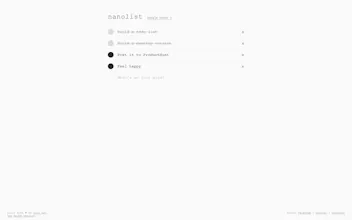
Nanolist gallery image
Launch tags:MacWeb AppProductivity
Launch Team
AssemblyAI
AssemblyAI
Build voice AI apps with a single API
Promoted

What do you think? …

Dan Dan
And yet another list app. Let me say first that what I say here doesn't take away the hard work that goes into building apps or even checklist apps for that matter. I know it's not as simple as it looks. However, my pet peeve of 2018 is the app descriptions / slogans... "World's cleanest todo list" Well... Is it clean because it's black and white? Is it clean because it has basic design elements? Or because it has no features? I think I rather have a "dirty" full featured list app, than a "clean" basic check list. How does "clean" benefit me? Will it even be around in a year or so? Do we have any privacy? Do you know/track the items I enter in my list? I know nothing, and the website provides me no information. At the end of the day if this is a just "show off my skills app" that's great, but if you want it to be something more then there needs to be more information provided or at least a roadmap/plan for the near future. Do we need another "list" app? Sure there's always room for improvement. Will I use this one? No, it doesn't do anything that other list apps do. And there are several that claim to be "clean" and "simple".
Luca Spanjaard
@tostartafire Jeez man. Give a guy a break.
Dan Dan
@luca_spanjaard I figured people post their apps here looking for feedback instead of a pat on the back.
Max
@tostartafire all your points are valid. The reason this exists is because some people (like yourself) would rather use a full featured app, but some other people (like me) don't always need it, but instead need a simple checklist. There's room for all of us :)
Luca Spanjaard
@tostartafire There are many ways of giving feedback. You don't have to be cruel about it.
Maxim Pekarsky
@tostartafire I like the aesthetic. I don't care that it *claims* to be clean or simple, or "world's cleanest" - I like what it is and what it does, and it looks clean to me - and, perhaps, to the other hundreds of upvotes.
Max
Hello, ProductHunt! This is my first time posting here and I couldn't be more excited! So, what the hell is Nanolist? Well, in every developer's life there's a moment when you have to build a todo list. Now, I know what you're thinking. Why does the world need another todo list? Well... For me personally, my todo app, namely Todoist is the number one productivity tool I use to organize myself. The problem I have with most todo lists however is that they all have tons of features related to everything except actual todos. I spent quite a while searching for a good todo app that will be just that, and I couldn't find a good option, so I decided to build it. So, what are the features? - Todo view (add/edit/delete) - Inline editing - Speed - Anonymous mode - Realtime sync - Mac app Thanks for your interest. I hope you find it useful :)
Isaac Perdomo
@rdev It's so simple that I got goosebumps using it. Super clean. Good job!
Max
@isaac_perdomo Thanks! I'm glad you like it :)
Parry Singh
@rdev Love it. Good Job!
Jeff Eisley
@rdev Where can I grab that sky background?
Binoy Xavier Joy
@rdev How about introducing a Typewriter font? :)
Andreas Duess
That is actually really lovely. The equivalent of a scrap of paper but on your screen.
Faiz Jamain
@andreasduess Best. Comment. Ever.
Maxim Pekarsky
There are a million to-do apps. I like this one. It's super clean and has sexy UX animations. Logging in is a breeze - there isn't even a *button*. Everything non-essential is stripped away.
Will Willems
If this is an Electron app I'm losing my mind
Dimitar Nestorov
@rutgerwillems It is, also a web app tho
Max
@rutgerwillems what's wrong with Electron? :)
Will Willems
@rdev normally it would be absolutely no problem to have multiple apps open on my MacBook Pro but when I'm running 5 Electron apps simultaneously my computer bogs down to the level of a snail in quicksand. Why, seriously why does something as a frigging todo list!! have to be an Electron app! With things like VS code I can absolutely handle it (not with Atom) but with something that isn't the main app I'm using it's just a no, #savemyram
Max
@rutgerwillems I totally agree, and trust me, if I could build a native app, I absolutely would. But I'm not a native developer, I only code JavaScript and a tiiiny bit of other non-desktop languages, so if I want to build a desktop app, my options are limited to things like Electron or NW.js. And while yes, Electron does have it's tolls, it's really up to the app. I don't think Nanolist is doing that bad to be honest 😅
Will Willems
@rdev true, I understand and for an Electron app ~100MB is actually pretty good, I've used one that displayed bookmarked shows that used around 800-900MB in the background.
kun

Always like simple and clean product and nano list just did this. No more extra ugly functionalities, just beautiful essences.

Pros:

Very simple and clean.

Cons:

If one line is very long, I can just see first a few words and following contents are invisible.

Jemanu Putra
You can actually read the rest by doing horizontal scrolling through it.
Maxim Pekarsky
A couple of small requests now that I've played around with a bunch: 1. it'd be great to be able to reorder to-do items by dragging them up and down (see trello card checklists as an example) 2. it's be great if completed items moved to the "finished" section right below, like this:
Max
@maxverse reordering is something I was contemplating myself. I'll need to think the "finished" section through so it doesn't affect the "cleanness" too much 😅
Maxim Pekarsky
@rdev totally understand. I try to code in a minimal way as well, and I know I agonize over adding every single element I add to the screen. Not sure if you use Trello, but their checklists allow you to re-order, but don't have a "finished" section - as opposed to Google Keep, which does. You can play around with them to see how the experience feels to you as a user.
12
Next
Last