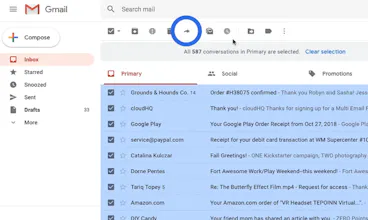
You’ll now have the ability to forward thousands of emails seamlessly (up to 30,000 emails a day). 5 Reasons to try it: 👉 A User-Friendly Solution 👍 It Runs In The Cloud 😉 Onboarding New Employees Made Easy 💼 Changing jobs 👏 Save Emails For Reference
@selimreza028 Hi Selim.
The transfer time depends on how many emails you have to transfer. Usually,Google send limits limit us up to 2000/day on mature Gmail accounts, or 500/day on new Gmail accounts. Here's a support note about it: https://support.google.com/a/ans...
Either way, we'll organize all of your emails so that it complies within Gmail send limits, and you'll never surpass your limitations.
Bottom line: We'll take care of it for you and send you an email when done. You can also ☑︎ on its status in your dashboard.
Report
We've recently downsized and had to let a few people go, unfortunately. Is it feasible to use this extension to archive emails as we restructure?
@rumana_akther Great question. You should always archive your emails regardless of restructuring. This is a really easy way to do it, and I'd suggest to forward it as a PDF too!
Hi 👋 hunters!
Since launching Multi Email Forward by cloudHQ 3 years ago, we've released some pretty big features for you to enjoy!
As some of you already know, this Chrome extension is an easy way to forward many emails at once.
Instead of going through the daunting process of sending separate emails one-by-one to the same email address, our multi email forwarder can automate the process and do it for you with just a few clicks.
✨✨ New features ✨✨
🔒 Your emails are encrypted during the transfer
📤 You can now forward emails as a PDF, EML, or exactly how you see it in your original email
📧 You can migrate all emails, just a label, or a selection of emails
This is an excellent solution if you:
1) Want a copy of your emails from your work email to your personal email, or vice versa
2) Change your job / school
3) Change your email address
4) Onboard a new employee and want to give them access to project-related emails
Whatever the reason, it's hard to justify spending hours or days forwarding emails when you can automate the process in minutes.
The freemium plan offers you 50 emails/day, while the premium plan lets you send an unlimited amount of emails.
If you have any questions or comments, we'd love to hear from you!
@lnchoi Hi Ellen, That's awesome! Thanks so much! Let me know if you need any help setting that up.
Sidenote intro: I really like what you're doing with @careerlark. Have you met @kidbombay from @hireclub before? You two should def talk. There's a lot of synergy.
Great timing! Your screencast shows me how easy it is to onboard new emplyees. I'll give it a try next week because we actually have a new person joining our sales team.
Local Lead Game
MailKing by cloudHQ
MailKing by cloudHQ
MailKing by cloudHQ
MailKing by cloudHQ
MailKing by cloudHQ
Icebreakers 3.0 COVID-19 edition
MailKing by cloudHQ
Icebreakers 3.0 COVID-19 edition
MailKing by cloudHQ