Launching today

Moli by Lexmount
The fastest headless browser for agents and harnesses
286 followers
The fastest headless browser for agents and harnesses
286 followers
Moli by Lexmount is our browser engine built from scratch for AI agents. It starts faster and uses less memory than Chrome. Use Moli through Lexmount Browser, our cloud browser platform. Run multiple isolated browser sessions with proxy support while we handle the infrastructure. Let your agents browse, fill out forms, and extract data. Try it in our Playground or connect through our SDK.




Free Options
Launch Team

Render: Get up to $100K in startup creditsThe fastest way to deploy and scale apps and agents
Promoted
Hey Product Hunt 👋
I’m Quinn, one of the builders behind Moli by Lexmount.
Moli is the fastest headless browser for agents and harnesses. It’s the custom-built engine powering the Lexmount Browser platform, helping your agents and harnesses run faster at a lower cost.
If you’re building agents and harnesses for research, data collection, or web automation, this is for you.
✍️ Here’s how to build with Moli:
Try it in our playground to verify your credentials and inspect the browser before coding.
Or use our SDK to control real cloud browsers with support for Playwright, CDP, extensions, proxies, downloads, and session replay.
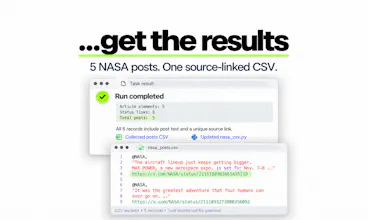
Run real web tasks and get verifiable results, like a CSV with source links.
Why use Moli by Lexmount:
Faster starts and less memory:Moli cold-starts around 5× faster than Chrome while using roughly 1/7 of the memory in our benchmarks.
Less infrastructure work: We handle browser setup and management.
Cloud scalability: Run multiple Moli-powered browsers simultaneously with cloud networking and proxy support.
Lower costs: 100 browser hours and 25 concurrent sessions for $12/month.
🎉 To celebrate our launch, Product Hunt users get 2 months of Moli by Lexmount Pro free. Click “https://browser.lexmount.com/?ref=producthunt” and sign up to claim your offer.
We’ll also be sharing more perks and giveaways on Discord soon:https://discord.gg/95QXqbsgVu.
Come share what you’re building and try Moli by Lexmount with us 🚀
@new_user___0524xieqiqi Congrats on the launch quinn Can Moli handle tasks across multiple browser session at once?
@shivam_kushwaha16 Since Moli is lightweight enough, you can easily launch multiple Moli instances to handle multiple browser sessions. Moli provides the ability to specify browser contexts.
If you've built enough agent workflows, you know that spinning up headless browsers can quietly become the most expensive part. If you're running thousands of headless Chromes, the resource costs keep climbing (just think of how your laptop fans keep spinning up). Moli by Lexmount was purpose-designed to consume a mere 1/7 of Chrome’s idle memory, which directly results in lower costs.
If you’re building a harness like Hermes or a browser layer for a coding agent like Codex, this is worth a look.
Moli is an open-source browser engine built for agents, not an agent wrapper. You can use it locally or through Lexmount’s cloud offering.
Start in the playground: connect your account, run a real web task, then inspect what happened. You can move to the SDK once you know how it behaves in your workflow. See how speed and costs compare rather than relying on any of the claims on the slides above!
@chrismessina Thanks, Chris! 🙌
That's exactly why we built Moli from scratch. Traditional browsers like Chrome were designed for humans, but AI agents have very different needs.
By building a browser engine specifically for agents, we've reduced unnecessary overhead, achieving around 5× faster cold starts and using just 1/7 of Chrome's idle memory in our benchmarks.
With Lexmount Cloud Browser, developers can take advantage of this efficiency at scale without having to manage browser infrastructure themselves.
Excited to see what developers build with Moli! 🚀
@chrismessina Interesting that it uses so little memory compared to chrome on the launch
@chrismessina @shivam_kushwaha16 Thanks, Shivam! 🙌
That's one of the key reasons we built Moli from scratch. Chrome was designed for human browsing, while Moli is purpose-built for AI agents. By eliminating unnecessary overhead, we've reduced idle memory usage to around 1/7 of Chrome's in our benchmarks.
This makes a huge difference when you're running dozens or even hundreds of browser sessions simultaneously, especially in terms of infrastructure costs! 🚀
Hi everyone! I’m Donough Liu, one of the makers of Moli by lexmount.
One thing we’ve been deliberate about while building Moli: making it lightweight and headless shouldn’t come at the expense of browser security.
We’ve put substantial work into browser security (including same-origin restrictions, iframe sandbox restrictions, CSP, CORS, subresource integrity, MIME-type enforcement, and Referrer Policy..). These protections matter just as much when an AI agent is browsing as when a person is. 👻
That work rarely shows up in a demo, but it’s a core part of making Moli production-ready. Real-world automation needs a browser that respects the web’s security boundaries, alongside speed and efficiency. We’re building Moli with all of those responsibilities in mind.
@ldm0 Great point, Donough! Speed and efficiency matter, but security is just as important. Thanks for highlighting the work behind the scenes!
Hey Product Hunt 👋 I’m Nico, one of the makers of Moli by Lexmount.
I wanted to share how our new Cloud Browser Agent fits alongside Moli and the Lexmount cloud platform:
Moli is the browser engine. It’s open source and built for AI agents, providing page structure, interaction, and rendering on demand.
Lexmount is the cloud platform. We provide managed browsers and web access APIs. Bring your own agent or automation code, and we handle the browser infrastructure.
Cloud Browser Agent carries out the task, using our CAE protocol to understand and interact with web pages. Give it a goal and an optional starting URL. For recurring tasks, save your instructions and output format as an Agent, then create a Run for each execution.
CAE — Content, Action, Effect — connects page content, available operations, and browser-observed changes, using incremental updates to reuse stable page context. For a closer look at how CAE works and the reasoning behind its design, here’s our technical write-up: CAE Protocol.
For developers, this means decisions grounded in browser feedback, less redundant input and token overhead, and an execution trace you can inspect.
What browser task would you want to hand off first?
@hahahuthu Thanks for the clear breakdown, Nico! Excited to share what we’ve been building with everyone 🙌
Can I take over a browser session manually if my agent gets stuck?
@new_user___31020255125d892e50675c9 Yes! Our online Live View lets you see what’s happening in your browser session and interact with it manually if your agent gets stuck. You can try Live View yourself in our Cloud Browser Playground.
what's its difference with ego lite? another AI browser proudct
@jackinlearning96 They’re two different types of products. ego-lite is a Chromium-based desktop browser for people and AI agents to use together.
Moli is a lightweight headless browser engine for agents and automation, with faster cold starts and a smaller memory footprint. You can run it locally alongside your everyday browser or deploy it on the Lexmount platform, keeping automation separate from your personal Chrome session.
Our focus is browser infrastructure developers can build on, rather than an everyday browsing app.
Does Moli support modern web standards?
@romy_chou Yes! Moli supports modern web standards and can replace Chromium for most browser automation workflows, including Playwright and Puppeteer. Some downstream projects already use Moli to test frontend frameworks, too, with a much lighter resource footprint.