Launched this week
MiroMiro

MiroMiro

Copy any website's design & assets in one click

728 followers

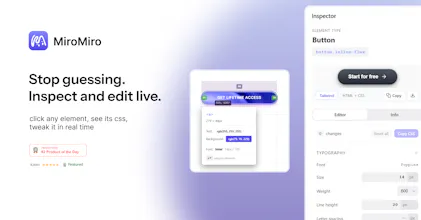
The fastest way to copy any website's design. MiroMiro is a Chrome extension that lets you inspect and extract design assets from any website without opening DevTools. Hover over any element to instantly copy its CSS, colors, fonts, and spacing. Download images, SVGs, and even Lottie animations with one click. Extract design tokens and export them as Tailwind config or CSS variables. Built for designers and developers who want to stop rebuilding from scratch and start shipping faster.
MiroMiro gallery image
Free Options
Launch Team
ace.me
ace.me
Your new website, email address & cloud storage
Promoted

What do you think? …

Soraia
Hey everyone! 👋 I built MiroMiro because I was tired of the same frustrating workflow: see a design I like, open DevTools, dig through nested elements, copy values one by one, repeat 100 times. DevTools is powerful, but it's not built for quick design extraction. So I made MiroMiro, hover over any element, copy its CSS instantly. One click to download images, SVGs, or even Lottie animations. Extract an entire site's color palette and export it straight to Tailwind or CSS variables. It's the tool I wished existed when I started building websites. Would love your feedback on: - Which features would make you use this daily? - What's missing that would make this a no-brainer for your workflow?
Julia Zakharova

@soraiadev Happy New Year! I installed the plugin and will try using it in my testing work, as I sometimes check styles and look for bugs. Thanks!

Soraia

@julia_zakharova2 Happy New Year! Thank you so much for trying MiroMiro :D

Kiran Bharambe

@soraiadev Congrats on the launch. This solves a real, everyday pain point. The hover to copy CSS and one click asset download alone is a huge time saver. Exporting palettes straight to Tailwind is a really nice touch too. I’d personally love to see breakpoint specific styles and font usage summaries. Excited to see how MiroMiro evolves.

Soraia

@kiranships Thank you so much! 🙏 I’m glad to hear those features are already saving time, it’s exactly what I hoped for. Breakpoint-specific styles and font usage summaries are some great ideas, and definitely things I’ll keep in mind as I continue evolving MiroMiro. Excited to keep improving and hearing feedback like yours!

Malek Moumtaz
@soraiadev This definitely removes a lot of DevTools friction! How do you think about handling dynamic or computed styles (framework overrides, breakpoints, hover states), so what users copy reflects the intended design system and not just a momentary DOM snapshot?
Soraia

@malekmoumtaz dynamic and computed styles are tricky! I will explore ways to handle this. Thank you a lot for your feedback. I'm always open to feedback on how I can improve this!

Bekjon Ibragimov

@soraiadev That does address one of the pain points I constantly deal with as a dev

Josie OY

Congratulations on the launch! I think this product is really interesting and fits a designer's workflow perfectly. I’ve already recommended it to our design team and tried it out myself.

While the Inspector Mode is great, I’ve run into a specific issue:

1. When I know there is an image in a specific part of a page that I want to download, I turn on Inspector Mode and click on it.

2. Currently, it only captures the style data for that element.

3. It doesn't seem to retrieve the actual image file or asset within that `div`.

Right now, all the images and SVG assets for the entire page are mixed together in the general "Images" or "SVG" tabs. When a page has a lot of assets, it becomes very difficult to find the specific one I need.

Is there a way to make it so that when I click a specific `div`, the images or SVG assets contained within that section are displayed exclusively? It’s possible the feature already exists and I just haven't figured out how to use it yet

Soraia

@josie_oy Thank you so much for the kind words and for taking the time to share such detailed and honest feedback, I really appreciate it! I’m continuously improving MiroMiro based on user feedback like yours.

I understand the issue you’re describing. At the moment, Inspector Mode focuses on capturing the selected element’s styles, and in some cases images or SVGs inside a div can be tricky to retrieve directly, which is why you currently need to rely on the Assets tabs. I agree that when a page has many assets, this can quickly become hard to navigate.

I’ll work on enhancing this in an upcoming version. Your feedback truly helps make MiroMiro better every day. Thanks again for sharing it! 😊

Josie OY

@soraiadev Your product is really well-made. I wish you guys great success!😊

Filipe Picoito

Hey @soraiadev I've tried myself and I'm really impressed.

The inspector is really cool, it's super useful, and the feature that I love the most is the assets fetching. It's very normal to me to browse websites and want to retrieve some images for figma mockups, and MiroMiro makes this super easy, I just go to the assets tab, search the one I want, and download it!

Hope you're really successful with this, it's a great tool!

Eliana

As a backend developer that doesn't like frontend much, MiroMiro is an amazing tool to extract designs fast

Moni_z

I usually live in Chrome DevTools, but MiroMiro is just faster. When refining the UI for Dashform, I often need to quickly check a font size or color palette from a site I admire. This extension lets me grab that CSS in a single click without digging through the DOM. It’s a massive workflow upgrade for frontend devs.

Soraia

@moni_z So glad to hear it’s making your workflow smoother! 🙌 That’s exactly what I aimed for. Really appreciate you sharing how it’s helping with Dashform!

Vincent

DevTools works but it's a pain for quick design extraction.

This fixes that. Clean product. Congrats on the launch.

Soraia

@testyourideaapp Thank you a lot Vincent, super happy you like MiroMiro :D

Abdul Rehman

This is such a real problem. Digging through DevTools for small style details gets tiring fast. Hover and copy sounds way more natural. Just curious how often you use this in a normal workday?

1234
Next
Last