
Launching today

MindTrack
Minimal Focus Widget for Everyone.
6 followers
Minimal Focus Widget for Everyone.
6 followers
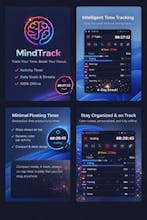
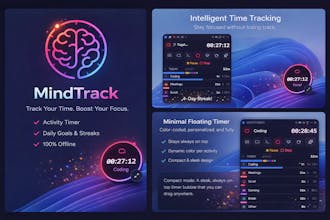
MindTrack is a lightweight, always-on-top Windows widget that helps you track how you spend every minute of your day. Pick an activity, start the timer, and let MindTrack do the rest. Switch between tasks with a single click — your sessions are logged automatically. No cloud accounts. No subscriptions. No bloat. Just a small floating widget that sits quietly on your desktop and keeps you honest about your time. (Coming soon for mac)
Magnus UI
Key Features
Timer & Activity Tracking
One-click activity switching — tap an icon to start tracking instantly
Persistent timer that accumulates daily totals per activity
Pause, resume, and switch between activities seamlessly
Timer continues from where you left off when you return to an activity
Compact & Expanded Modes
Expanded view: Full widget with timer, activity selector, controls, and daily summary
Compact circle mode: Minimalist circle showing only the timer and a revolving dot that completes one orbit every 60 seconds — like a visual second hand
Daily Goals & Streaks
Set per-activity goals with two modes:
Reach: Target a minimum (e.g., "Code for at least 4 hours")
Stay Under: Set a limit (e.g., "Social media under 30 minutes")
Goals are tracked per day — changing a goal today won't rewrite yesterday's history
Consecutive-day streak counter with fire icon for each activity
Overall fire icon when all daily goals are met
Daily Summary & History
Color-coded breakdown bar showing time distribution
Per-activity progress bars with resume dots marking session boundaries
Browse past days with left/right navigation
Each day shows the goals that were active on that specific date
Celebrations
Confetti burst when you hit a "reach" goal (with sound effect)
Three cheer-up buttons to celebrate anytime:
Confetti — colorful particle burst at random positions
Fireworks — three staggered explosions with sparks and crackle sounds
Rocket — launches from the bottom in a curvy trajectory, explodes at a random point
All animations stack — spam them to your heart's content
Synthesized sound effects for each animation (no external files)
Customization
Adjustable window opacity (20%–100%)
Fully editable activities: name, icon (30+ options), color (15+ palette)
Add unlimited custom activities
Draggable, frameless, transparent window
System tray integration — hide/show with a click
Smart Design
Always-on-top so it's never buried under windows
Frameless transparent window with rounded corners
Smooth animations throughout: breathing effects, shake-rotate on selection, bar growth, fade-ins
Dark theme optimized for long sessions
What's Included
Windows installer (.exe)
Portable version (no install required)
Full source code
All future updates
Who Is This For?
Developers who want to track coding vs. meetings vs. distractions
Freelancers who need to account for billable hours
Students balancing study time, gaming, and social media
Anyone who wants to understand where their day actually goes
Technical Details
🛠 Technical Details
🖥 Platform – Windows 10 (1903+), Windows 11
⚙️ Framework – Electron + React + TypeScript
📦 App Size – ~80 MB installed
💾 Storage – Local JSON files (no cloud, no accounts)
📁 Data Location – %AppData%/mindtrack/data/
🚀 Auto-Start – Optional (via system tray)
🔒 Privacy – 100% offline — no data leaves your PC