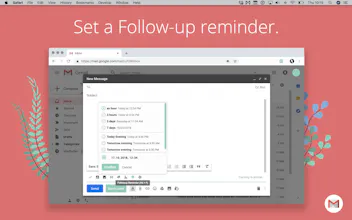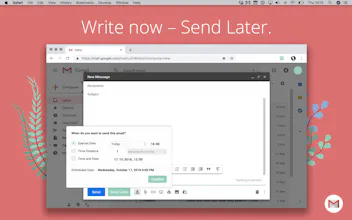
Email in no time. Mailbutler is a Chrome extension that supercharges Gmail with a powerful suite of time-saving tools: schedule emails, get read receipts, insert message templates, turn emails into tasks... Version 2.2 come with Material Design plus exciting new features: Slack notifications, productivity dashboard...and more.
One thing I wasn't clear on, how many accounts does this support? IE, if I have a personal gmail and work g suite, can I use one subscription for both like Boomerang?
@bwb Hey Ben! ๐บ Yes, you can use one Mailbutler subscription for unlimited number of email accounts. If you're working in a team - we also provide flexible team options, meaning members in your team / company can each be on different subscription plans. Happy to hear your thoughts and feedback!
Interesting product, how Mailbutler will deal with the latest Gmail Privacy updates when Gmail extension will require penetration testing and the access to their APIs is far more restricted beginning on March(?) next year?
๐ Hello, Product Hunt community!
Mailbutler is a light-weight Chrome extension that supercharges Gmail productivity, elegantly designed to help declutter your inbox:
Despite new smart features, Gmail is still far from being the perfect organizational system that pushes the concept of email forward.
Today, we're happy to bring you Mailbutler 2.2: elegantly designed for the new Gmail, delivering you all of Mailbutler's popular features and exciting new ones: Slack notifications, productivity dashboard ... and more.
NEW features in version 2.2:
๐ Material Design: elegantly bringing you all of Mailbutler's nifty tools to the new Gmail
๐ค Mailbutler Slackbot: receive Slack notifications when your email or link has been opened, and when your task is due
๐ Task integrations: sync your email tasks with Todoist, Wunderlist, MeisterTask, Google Tasks, ToodleDo ... and more. No additional apps needed.
๐Dashboard: view your productivity, saved time, and usage at one glance on our redesigned web Dashboard!
Mailbutler is designed in Berlin with secured servers located in Frankfurt. With Germany having one of the strictest data privacy protection laws in the world, our privacy-by-design principle demonstrates professionalism with no compromise to the service we provide. ๐
Thank you @chrismessina for hunting us today. Our team has worked very hard over the past months finetuning every detail of Mailbutler to bring you a better Gmail experience - so we're looking forward to your feedback and suggestions. ๐
Enjoy the new supercharged Gmail!
Fabian and the Mailbutler team
Report
Very powerful tools, Mailbutler respect privacy this is the most important thing that others d'ont do
I've been using mailbutler for over a year and absolutely find it essential to my professional needs on a daily basis. Would highly recommend this product to any professional who wants to supercharge their email.
Pros:
Schedule emails for later, create beautiful signatures, and customize times to snooze your inbox
Cons:
none I can think of at the moment!
Report
Mailbutler is available for both Gmail and Apple Mail. As someone who used the G suite for my professional needs for a very long time, I've worked with many Gmail plugins. I like Mailbutler the best as it's an 'all in one package'. I used to have three of four plugins installed, and now this one is all I need.
Pros:
- Huge amount of new features without clogging existing interface
- Sent Later, Tracking, Notes and Tasks are must haves!
Cons:
- Irregular update schedule, but getting better
Report
Something like what Herald does.
Pros:
The one app that not only turbocharges Gmail but also Apple Mail
Cons:
I wish there'd be a way of seeing the entire email in the mac notification and be able to mark it as read directly from there.
Deep Work Stats
Blinkist
Deep Work Stats
Pistats.io
Mailbutler
Blinkist
Bublup
I've been using mailbutler for over a year and absolutely find it essential to my professional needs on a daily basis. Would highly recommend this product to any professional who wants to supercharge their email.
Pros:Schedule emails for later, create beautiful signatures, and customize times to snooze your inbox
Cons:none I can think of at the moment!
Mailbutler is available for both Gmail and Apple Mail. As someone who used the G suite for my professional needs for a very long time, I've worked with many Gmail plugins. I like Mailbutler the best as it's an 'all in one package'. I used to have three of four plugins installed, and now this one is all I need.
Pros:- Huge amount of new features without clogging existing interface
- Sent Later, Tracking, Notes and Tasks are must haves!
Cons:- Irregular update schedule, but getting better
Something like what Herald does.
Pros:The one app that not only turbocharges Gmail but also Apple Mail
Cons:I wish there'd be a way of seeing the entire email in the mac notification and be able to mark it as read directly from there.