Macmoji
Slack-style emoji for your mac! :smile:
1 follower
Slack-style emoji for your mac! :smile:
1 follower
Macmoji is Slack-style emoji autocompletion for your Mac
1 follower
1 follower

 Osaurus
 Emojistickers 2.0
 Newji
Newji OsaurusNewjiNewji

 UpscopeNewji
 Summer Bod 2020


 Automagical.ai
 NewjiNewji
 Newji
Newji


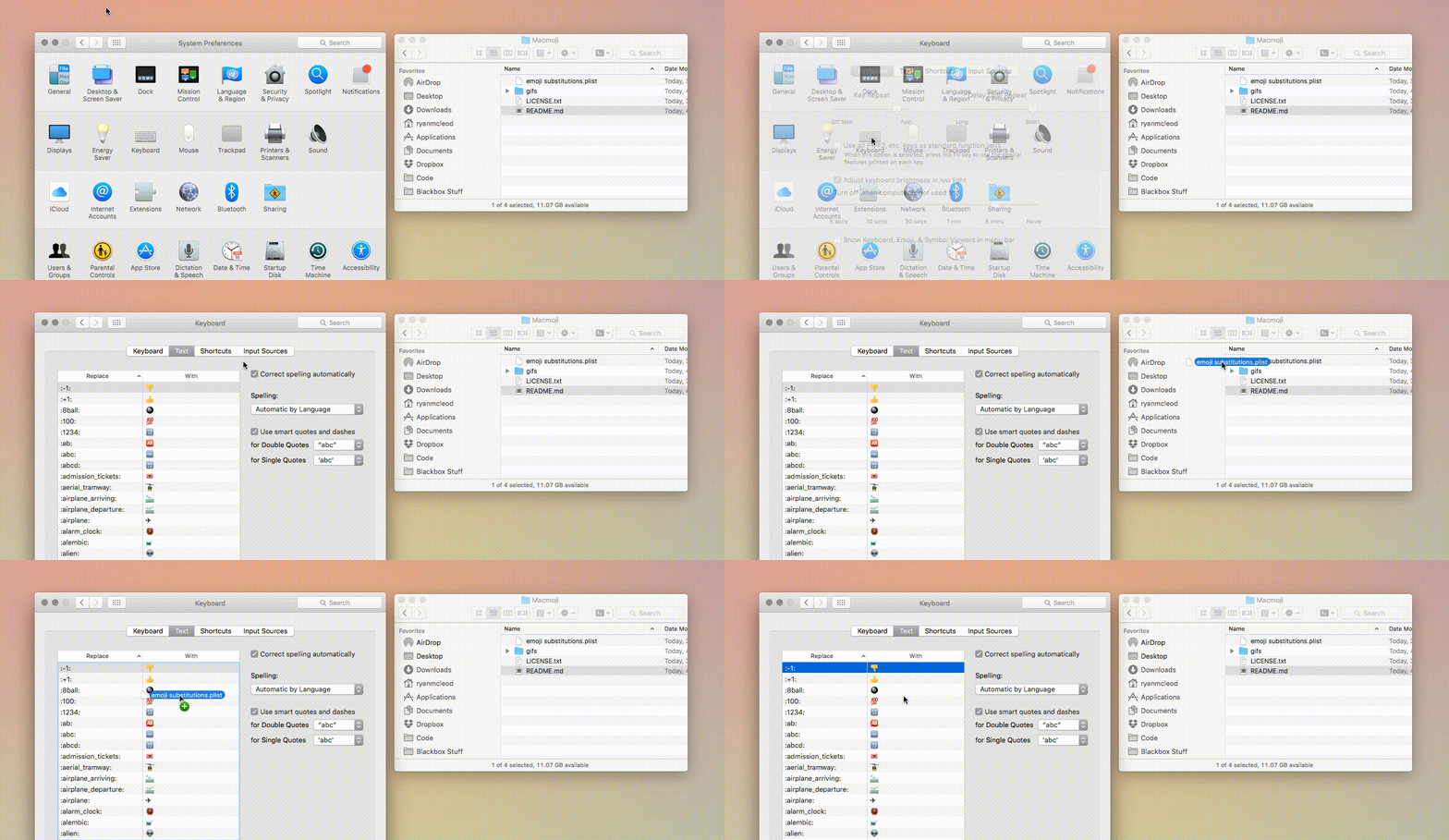
 Installation is super easy — such a great trick @warpling:
1. Download emoji substitutions.plist
2. Open System Preferences and navigate to Keyboard > Text
3. Drag the emoji substitutions.plist to the list of substitutions to add them
4. Type something like :boom: or :blackbox: and hit space after! 💥⬛️
Installation is super easy — such a great trick @warpling:
1. Download emoji substitutions.plist
2. Open System Preferences and navigate to Keyboard > Text
3. Drag the emoji substitutions.plist to the list of substitutions to add them
4. Type something like :boom: or :blackbox: and hit space after! 💥⬛️