Launched this week
LumiMax

LumiMax

Push your Mac's display to 1600 nits

2 followers

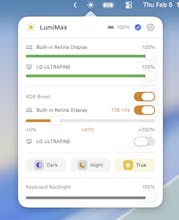
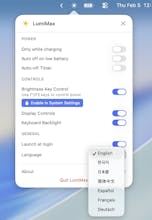
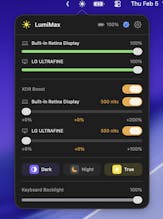
LumiMax pushes your Mac's XDR display to its full 1600 nits — using Apple's native EDR, not gamma tables, preserving color accuracy with better battery efficiency. -XDRboost up to 1600 nits -System brightness, keyboard backlight, Dark Mode, Night Shift, True Tone -F1/F2 key control with custom OSD -Multi-display support -Smart battery protection Free trial. One-time Pro upgrade, no subscription Product Hunt exclusive: use code LUMIMAXPRO1 for 50% off Pro ($9 instead of $17.99) - limited to 50!
LumiMax gallery image
Free Options
Launch tags:Menu Bar AppsTechApple
Launch Team
PinMe
PinMe
Publish Sites in Seconds. Tamper-proof by design.
Promoted

What do you think? …

Ramster
Maker
📌
Hi! I'm a solo developer from Korea. There are already XDR brightness boost apps out there, but I wasn't satisfied with any of them: - Too expensive — I wanted something more affordable - Not bright enough — none of them actually push to the full 1600 nits - Colors get distorted — gamma table methods shift your color accuracy - Battery drain — gamma-based boosting keeps the backlight maxed, killing your battery So I built LumiMax using Apple's native EDR overlay. It hits the full 1600 nits, preserves color accuracy, and is more battery-efficient. I also wanted an all-in-one display controller — system brightness, keyboard backlight, Dark Mode, Night Shift, True Tone, all in one menu bar app. And it works with external displays too (Pro Display XDR, LG UltraFine). Free to try. Would love your feedback!