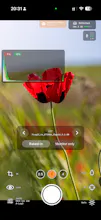
Log Cam is iPhone camera app for filmmakers. Log Cam records HEVC and ProRes video from RAW frames with log gammas, monitoring tools, LUT support, and external storage recording.
No reviews yetBe the first to leave a review for Log Cam
Hi Sebastian,
First of all, thank you for LogiCam. I purchased the app a couple of days ago and have really enjoyed exploring it.
Today I updated my iPhone 12 Pro to iOS 26.5. Since then, recording consistently stops with Error 1037. Although with previous version 26.1 recording also failed but after about 30 seconds.
My device has 25 GB of free storage out of 128 GB, and I've already disabled all optional processing features:
Stabilization: Off
Gyroflow: Off
Lens Calibration: Off
Vignette Correction: Off
Noise Reduction: Off
Debayer Quality: Normal
I've also tested different settings:
Codec: 4:2:0 HEVC
Bitrate: 60 Mbps and 300 Mbps
Frame Rate: 24 fps and 25 fps
White Balance: Auto and Manual
Focus: Auto and Manual
Exposure: Auto and Manual
Various shutter speeds
F-Log2C color preset
Open Gate and non-Open Gate modes
The issue remains the same:
Camera 2 stops recording after about 3–6 seconds.
Camera 1 also stops after about 3–6 seconds.
Camera 0.5 records for around 30 seconds before stopping.
I'm not using any LUTs, and I'm running the latest version of LogiCam.
Could you please help me understand what might be causing Error 1037?
Thank you for your help.
Report
Hi Sebastijan!
I sent you an email a few days ago, but it was probably buried along all the spam. Here's what I wrote:
I have been experimenting with the trial version of Log Cam, and I love the high quality files I can get with it. I've been waiting for an app like this for a what it feels like forever. Nevertheless, I have some questions:
When in Manual Focus, there's a warning saying that manual focus can be unreliable for shutter speeds longer than 1/60''. Sure enough, when I input slower speeds like 1/50'', a 1037 error appears, and the recording stops. I tried with faster shutter speeds, such as 1/120'', and although the recording lasted longer while I changed the focus, eventually the same error appeared. Will this be corrected in a future update?
There's no autofocus during recording, as far as I can tell. Is this because it is technically impossible, or will it be implemented eventually?
It would be great if there was a option to save the recorded videos in the native photos app. I don't know if that's possible to add, though.
I gather that it isn't possible to record at 60fps because your app is processing large DNG files, correct? Would it be possible, however, to provide a 1080p mode and 60fps at the same time? I ask this because I usually film at 60fps in order to counteract the lack of motion blur, since it isn't always feasible to carry a variable ND.
Report
I am very impressed, I love it. Please, any heat issue or record time limitation when recording internally?
Report
Hunter
@otman_alami No issues with the correct settings. iPhone 12 could record in 4K for 43+ minutes in sunlight without any dropped frames. But, you would have to test it on each device.






Hi Sebastian,
First of all, thank you for LogiCam. I purchased the app a couple of days ago and have really enjoyed exploring it.
Today I updated my iPhone 12 Pro to iOS 26.5. Since then, recording consistently stops with Error 1037. Although with previous version 26.1 recording also failed but after about 30 seconds.
My device has 25 GB of free storage out of 128 GB, and I've already disabled all optional processing features:
Stabilization: Off
Gyroflow: Off
Lens Calibration: Off
Vignette Correction: Off
Noise Reduction: Off
Debayer Quality: Normal
I've also tested different settings:
Codec: 4:2:0 HEVC
Bitrate: 60 Mbps and 300 Mbps
Frame Rate: 24 fps and 25 fps
White Balance: Auto and Manual
Focus: Auto and Manual
Exposure: Auto and Manual
Various shutter speeds
F-Log2C color preset
Open Gate and non-Open Gate modes
The issue remains the same:
Camera 2 stops recording after about 3–6 seconds.
Camera 1 also stops after about 3–6 seconds.
Camera 0.5 records for around 30 seconds before stopping.
I'm not using any LUTs, and I'm running the latest version of LogiCam.
Could you please help me understand what might be causing Error 1037?
Thank you for your help.
Hi Sebastijan!
I sent you an email a few days ago, but it was probably buried along all the spam. Here's what I wrote:
I have been experimenting with the trial version of Log Cam, and I love the high quality files I can get with it. I've been waiting for an app like this for a what it feels like forever. Nevertheless, I have some questions:
When in Manual Focus, there's a warning saying that manual focus can be unreliable for shutter speeds longer than 1/60''. Sure enough, when I input slower speeds like 1/50'', a 1037 error appears, and the recording stops. I tried with faster shutter speeds, such as 1/120'', and although the recording lasted longer while I changed the focus, eventually the same error appeared. Will this be corrected in a future update?
There's no autofocus during recording, as far as I can tell. Is this because it is technically impossible, or will it be implemented eventually?
It would be great if there was a option to save the recorded videos in the native photos app. I don't know if that's possible to add, though.
I gather that it isn't possible to record at 60fps because your app is processing large DNG files, correct? Would it be possible, however, to provide a 1080p mode and 60fps at the same time? I ask this because I usually film at 60fps in order to counteract the lack of motion blur, since it isn't always feasible to carry a variable ND.
I am very impressed, I love it. Please, any heat issue or record time limitation when recording internally?
@otman_alami No issues with the correct settings. iPhone 12 could record in 4K for 43+ minutes in sunlight without any dropped frames. But, you would have to test it on each device.
@sebastijan_grabar Very powerful