Kopier

Kopier

Speed dial for your frequently shared profile links

19 followers

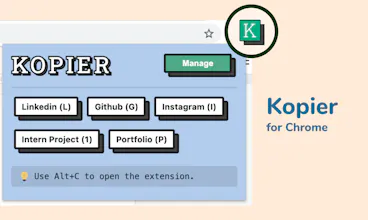
Kopier lets you store your frequently shared profile links and access them lightning fast with shortcuts. Add unlimited links with custom keyboard shortcuts 100% free forever.
Kopier gallery image
Free
Launch Team
Vy - Cross platform AI agent
AI agent that uses your computer, cross platform, no APIs
Promoted

What do you think? …

Sai Bhaskar Devatha
Hello PH! Today, I and @aniket_mandle are thrilled to finally introduce ✨ kopier.xyz ✨ Applying for a Job? Filling out a form? Whatever you are filling in, probably needs you to go out in the browser and search for your profile link, then copy, then paste it into the form. Maybe you even have to fiddle a bit to get to your profile link. It's slightly annoying until you move on and are eventually reminded of it in your next form. It doesn't have to be this way πŸ™„ That's how Kopier was born. Now you can paste your profile links without having to search! Kopier lets you get a link lightning fast: πŸ”— Add your frequently shared profile links to Kopier ↖️ Define custom keyboard shortcuts for every link ⌨️ Hit keyboard shortcut to copy You can use it to save frequently shared profile links like Calendly πŸ—“οΈ Buy me a Coffee β˜• Social Media Profiles 🀳 (Linkedin, Github, Behance, Instagram you get it), Portfolio 🌐 Side project links πŸ“½οΈ Master documents πŸ“„ at work or even Spotify playlists 🎢 The best part? - Kopier is 100% free, now and forever (No credit card required) - Zero step access, no account creation required - Secure local storage (We do not store your links) - Store unlimited kopies Try the extension at kopier.xyz/extension We can't wait to hear what you Kopy, Let us know in the commentsπŸ‘‡
Sai Bhaskar Devatha
Styling library credits - @thesephist πŸ™πŸ»
Chris Messina
@aniket_mandle @saibhaskardevatha love this β€” congrats on the launch! I built something similar in Alfred but building this as an extension is very smart!
Aniket Mandle
@chrismessina Thanks Chris! This means a lot . Would you be open to discuss feedback on V2 of Kopier!?
Aniket Mandle
We had an absolutely fun time building Kopier! I hope this takes a little bit of annoyance from filling forms.
Rahul Jain
Do you guys provide any keyboard shortcuts to get the copied link in the browser? For example - If I have 5 links like LinkedIn, 3 Git repos & fb. Can I just do something like Space + L to copy linkedIn's URL? Might be an interesting thing. Cool product. Upvoted. All the best!
Sai Bhaskar Devatha
Thanks a lot @rahul_2992 Right now, the chrome browser doesn't allow us to dynamically define the keyboard shortcuts. Hence, we first ask the user to use Alt/Opt + C to open our extension and then the single character shortcut for copying the link. That being said, we are searching for ways to make it even simpler to copy/paste, you can expect that in our next version. :D
Rahul Jain
@saibhaskardevatha Looking forward to try
Alexey Shashkov
Cool idea!
Sai Bhaskar Devatha
Thanks a lot @shashcoffe
Alexey Shashkov
@saibhaskardevatha It's pleasure of mine!
Alex Mathew
I've been using this for the past week or so, and this is genuinely so helpful! Can't wait to see more people try it out! Congratulations on the launch, @aniket_mandle and @saibhaskardevatha!
Sai Bhaskar Devatha
Thanks a lot @alxmth03
Abhash Kumar
Perfect πŸ™ŒπŸΌ I was looking for something like this literally this week. πŸ˜€
Sai Bhaskar Devatha
Thanks a lot @abhash_kumar2
Joe Albert
Akhil BVS
Super Cool product! I'm really bad to saving things, going to use this right away. Thanks for building and congratulations on the launch guys, all the best!
Sai Bhaskar Devatha
Thanks a lot @akhilbvs πŸ”₯
123
β€’β€’β€’
Next
Last