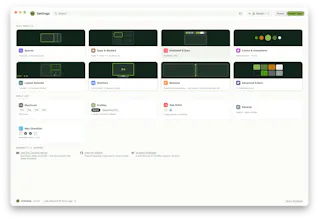
KiwiDesk is a tiling window manager for macOS that keeps your Mac calm and organized: every window finds its place in one of seven layouts, apps open with a shortcut, and mouse users get a Space Bar they can drag windows onto. It works with your native macOS Desktops: bind a profile to each one and it loads the moment you swipe there, with its own spaces, layouts, colors and shortcuts. Everything is set in a native Settings app, no config file needed. Free to use, source on GitHub.
Why can't window management on macOS just work out of the box, with a proper native GUI, instead of terminal configs and Linux-style setups?
Hey Product Hunt! 👋 I'm Maikel, a solo developer from Germany. Life taught me that our time is the most precious thing we have, so I grow Kiwis for the boring stuff. The freshest one is KiwiDesk.
I love tiling window managers, but I could never recommend one to my non-programmer friends. On macOS they all want terminal configs, and the most powerful one wants you to disable SIP. I wondered whether any of that is really necessary.
KiwiDesk is my answer to this problem:
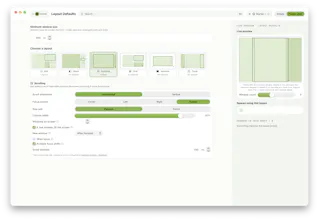
- Windows organize themselves — 7 layouts, including an "infinite scrolling" desktop where your apps sit on a ribbon that glides as you focus.
- A real native settings app with sliders and pickers. Mouse users get clickable space/app bars. Keyboard people get hotkeys, Vim-style layers, and "Open or Focus": one key opens an app or brings its window to you.
- Needs only the Accessibility permission. You don't need to turn SIP off, no input-monitoring, no account, no analytics.
- Free for personal use, source-available under BSL 1.1 (MIT four years after each release). Lua + CLI under the hood for power users.
It's macOS 14+ on Apple Silicon, installable via Homebrew or a notarized DMG.
70-second trailer: https://youtu.be/RvziMM_B544
I'd love to know: what's kept YOU from trying a tiling window manager so far? That answer shapes what I build next. I'm here all day 🥝
Report
@maikelhajiabadi I like that there’s no config file to deal with. I’ve avoided window managers before because I didn’t want to spend time setting everything up.
@michal_rachtan1 KiwiDesk is supposed to work out of the box but will let you all the configurability to change things you might not like. :) Iteration by iteration I try to give more possibilities while holding the balance between a good UI where you can find things and give you as much options as possible! Next version (2.1.0) will be even more about configurability and actually I'll also add an MCP such that even if you'd like to change the configs and don't want to play around with the settings yourself, your LLM can do it for you :D
@suryansh_tiwari2 thanks a lot! Very likely you wont need all of them. Differently people have different taste in how their Layouts should tile their windows. In the end it comes down to your personal setup and taste. ;D Enjoy the journey!
@maikelhajiabadi Haha yeah that makes sense 😄 I’ll definitely give it a try and see how it feels. Also I shared an idea with you earlier and would love to hear your thoughts on it whenever you get a chance.
"needs only the Accessibility permission, no SIP disable" is the actual selling point for me over the terminal-config tiling managers, that's the exact tradeoff that keeps me from recommending yabai to anyone non-technical. curious how the per-Desktop profile binding holds up with external monitors though - if I unplug a second display, does the layout bound to that Desktop just wait for the monitor to come back, or does it get reassigned to whatever Desktop is next in line and I lose the mapping?
@galdayan that's something I fixed with the last version update (2.0) Spaces which held applications will get migrated to your unplugged device and maintain their layout. On reconnect they'll be properly there again. So e.g. your profile for 1 screen has 5 spaces it'll then have maybe 7. If you remove all applications from those spaces they'll disappear



KiwiDesk
@maikelhajiabadi I like that there’s no config file to deal with. I’ve avoided window managers before because I didn’t want to spend time setting everything up.
KiwiDesk
@michal_rachtan1 KiwiDesk is supposed to work out of the box but will let you all the configurability to change things you might not like. :) Iteration by iteration I try to give more possibilities while holding the balance between a good UI where you can find things and give you as much options as possible! Next version (2.1.0) will be even more about configurability and actually I'll also add an MCP such that even if you'd like to change the configs and don't want to play around with the settings yourself, your LLM can do it for you :D
EverTutor AI
Congrats on the launch! This looks really clean. Curious to see how the different layouts feel in day to day use. Nice work 👏
KiwiDesk
@suryansh_tiwari2 thanks a lot! Very likely you wont need all of them. Differently people have different taste in how their Layouts should tile their windows. In the end it comes down to your personal setup and taste. ;D Enjoy the journey!
EverTutor AI
@maikelhajiabadi Haha yeah that makes sense 😄 I’ll definitely give it a try and see how it feels. Also I shared an idea with you earlier and would love to hear your thoughts on it whenever you get a chance.
Build Check
👏🏻 👏🏻 👏🏻 👏🏻 👏🏻
Dial
"needs only the Accessibility permission, no SIP disable" is the actual selling point for me over the terminal-config tiling managers, that's the exact tradeoff that keeps me from recommending yabai to anyone non-technical. curious how the per-Desktop profile binding holds up with external monitors though - if I unplug a second display, does the layout bound to that Desktop just wait for the monitor to come back, or does it get reassigned to whatever Desktop is next in line and I lose the mapping?
KiwiDesk
@galdayan that's something I fixed with the last version update (2.0) Spaces which held applications will get migrated to your unplugged device and maintain their layout. On reconnect they'll be properly there again. So e.g. your profile for 1 screen has 5 spaces it'll then have maybe 7. If you remove all applications from those spaces they'll disappear