
Keytones
Distinct key sounds for uppercase, lowercase & more
112 followers
Distinct key sounds for uppercase, lowercase & more
112 followers
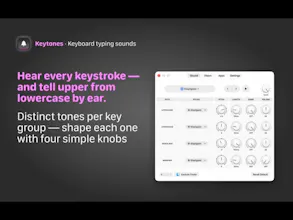
Ever typed a whole sentence in caps before noticing? Keytones plays a distinct sound for each key group (uppercase, lowercase, space bar, and modifiers) so your ears catch a stray Caps Lock before your eyes do. Tune Pitch, Length, Damping + Volume per group, import your own sounds, or, if audible feedback isn't an option, turn on Visual Feedback: a glowing screen edge that pulses with every keystroke. Per-app control, Siri + Shortcuts, instant triple-tap mute. One-time purchase, no subscription.


Payment Required
Launch Team

AWS Activate CreditsCredits that fuel your startup’s next milestone
Promoted
Hey Product Hunt! I'm Stefan, the maker of Keytones, a Mac menubar app.
I developed Keytones because I kept having trouble typing capital letters without realizing it. Keytones addresses this problem: It plays a different sound for uppercase letters, lowercase letters, the space bar, and the modifier keys (all customizable), so your ears will notice an accidentally activated Caps Lock key or an unpressed Shift key sooner than your eyes will.
What makes it different from "typewriter sound" apps:
Keytones isn't about imitating a mechanical keyboard. Each of the four key groups gets its own tone. You hear the difference between A and a immediately.
Key features:
Shape the sound for each key group with four knobs: Pitch, Length, Damping, Volume
Visual Feedback: A glowing border around the screen pulses with each keystroke, with the color and size varying depending on the key group. Can be turned on or off independently of keypress sounds. Ideal for environments where keypress sounds are disruptive or the audio output device has too much latency.
Per-app control: exclude apps or allow only the ones you pick
Import your own audio files via drag & drop
Instant mute: triple-tap a configurable modifier key (Right Command by default)
Siri & Shortcuts support
Remembers separate volume levels per audio device (MacBook speakers, headphones, Bluetooth)
One-time purchase, no subscriptions, no ads!
@stefan_keller Small idea, and I mean that as a compliment. Did you build this for yourself first? The uppercase distinction sounds like something you'd only think of after being annoyed by it personally.
@julian_belting Yeah, I actually built it just for myself at first. The German language is obsessed with capital letters, and my clumsy fingers don't always measure up ;-)
The visual feedback mode is what I actually want for meetings. Does the screen glow overlay show up on top of all apps, or only when Keytones is active? Per-app control: UI setting or plist edit?
@leo404 The visual feedback appears on top of all apps and can be turned on and off independently of the audio feedback (via the menu bar, or using the App/Siri shortcut). Keytones doesn’t have to be the foreground app for this to work; it’s a menu bar app that runs in the background. You usually only open the window shown in the screenshots—with the handy knobs—when you want to tweak the sound. The window doesn’t need to be open for the audio and visual feedback to work.
The quickest way to set which apps are allowed or excluded is through the app’s menu. the settings aren’t saved in the app’s UserDefaults but in its own local data store.
this is such a specific and real problem to solve - i definitely lose a few seconds every week to realizing mid sentence that caps lock snuck on. curious how well the pitch differences actually hold up once noise cancelling headphones are on, or if most people end up leaning on the visual glow instead once they've tried both
@omri_ben_shoham1 Often, the latency on Bluetooth headphones is too high for acceptable audio feedback, so most people will end up relying on visual feedback anyway.