Kai

Kai

World's first universal gesture controller

5 followers

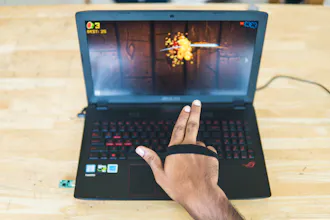
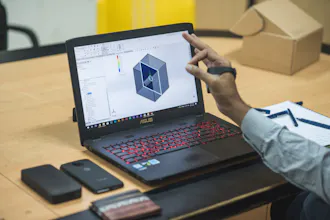
Kai is a gesture recognition device which you track hand and finger movements and control your devices with gestures. You can now scroll, select, pinch or even automate complex workflows in your apps with just a flick of your fingers. Kai will make you more efficient and productive at what you do every day.
Kai gallery image
Kai gallery image
Kai gallery image
Kai gallery image
Kai gallery image
Kai gallery image
Kai gallery image
Kai gallery image
Launch Team
AppSignal
AppSignal
Get the APM insights you need without enterprise price tags.
Promoted

What do you think? …

James Welch
This is really smart.
Vignesh Sankar
@jwelch Thanks James, do have a look at our Indiegogo Campaign!
Adarsh Warrier
Fortnite gaming with the KAI is my personal favourite. @chrismessina, Thanks for the hunt, a box full of love from our team is coming your way! :)
Shantanu Pratap Singh
I hope I can integrate my drone with this. Would be so cool to make it fly with just my bare hands, no controller!
Vignesh Sankar
@shantanu_pratap_singh You surely can! We would be releasing our SDK soon. Using our SDK, Kai can be programmed to control any digital device using intuitive gestures 😄
Alexey Krasnoslobodtsev
That's quite promising device, good luck!
Vignesh Sankar
@xe0s Thanks! Do check out our campaign on Indiegogo
Alexey Krasnoslobodtsev
@vignesh_sankar yeah, I found it, thanks.
Samarth Nayyar
A super smart way to edit videos! Imagine dropping videos in the timeline and stretching them with convenient gestures!
Vignesh Sankar
@samarth_nayyar it sure would make the video editor's workflow more exciting and efficient 😉👍
Saunak Sahoo
Integration with smart home products looks great!
Vignesh Sankar
@saunak14x thanks Saunak 😄
Syed Munawwer Ali

Nice product

Pros:

A new interface to communicate devices.

Cons:

seems little slow

Abhishek Satish
Thanks for the feedback! :D As for the con that you have mentioned, our initial tests reflect quite the opposite! Depending on the work, you can save as much as 40% of your time while using the Kai in conjunction with your keyboard and mouse. :) (Initial tests were mostly conducted with 3D modeling software)
12
Next
Last