JSX.Design

JSX.Design

The dev friendly no-code editor for React development

4.0
1 review

455 followers

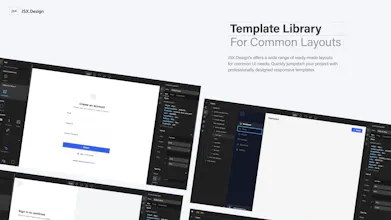
JSX.Design is a no-code WYSIWYG editor for React developers, letting you visually build responsive UIs while generating clean JSX code. Drag and drop components, customize styles, and sync code in real-time. Speed up development without losing control!
JSX.Design gallery image
Free
Launch Team / Built With
Unblocked AI Code Review
High-signal comments based on your team's context
Promoted

What do you think? …

Dameem Shahabaz
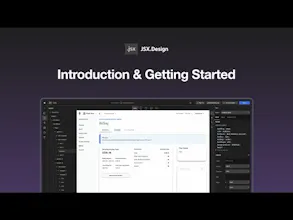
👋 Hey Product Hunt! I’m thrilled to introduce JSX.Design to you all—a tool designed by developers, for developers, that allows you to quickly build React UI components visually, while keeping full control over the code. 🚀 As someone who’s been in the trenches of UI development, I know how tedious and time-consuming it can be to code front-end layouts from scratch. JSX.Design was born out of my own frustrations with existing tools. I wanted a way to speed up the UI building process without sacrificing control over the code or being limited by a WYSIWYG editor’s constraints. And that’s exactly what JSX.Design does! What makes JSX.Design different? • 100% Clean Code: It generates raw JSX without adding any unnecessary dependencies. You can plug the components right into your project, making it perfect for production-level apps. • Seamless Customization: Want to add custom logic or state management? You can create controller files for your components and keep full flexibility. • Real-time Code Updates: Watch your code update in real time while you design. No more switching back and forth between editor and IDE. • Pre-built Component Libraries: Drag and drop components from libraries like ANTD and Material UI, then tweak them however you need—whether through CSS or component APIs. • Supports Typescript, Next.js, CRA, and React-based Projects: No matter which React framework or setup you prefer, JSX.design integrates smoothly into any React project, making it versatile for any workflow. • Design System Friendly: Store your design system variables in one place, and watch them update both at the code and CSS levels, ensuring consistency across your app. Why we built it? We’ve always loved building things fast and efficiently, but the trade-offs with existing WYSIWYG editors made us stick to hand-coding. JSX.Design bridges that gap by giving developers the speed of visual UI building without compromising on control, customization, or code quality. ⚠️ Currently, JSX.design is tested and optimized for Chrome and Edge browsers. For the best experience, we recommend using either of these for now. 🎥 Check out the demo and give it a try! I’d love to hear your thoughts and feedback. We’re launching with an exclusive Insider Program for early users—offering big discounts and a special badge to showcase that you’re part of the founding team! Thanks so much for your support, and I hope JSX.Design makes your development workflow faster and more fun! 👇 Drop any questions in the comments, and I’ll be here to answer them!
Moumen Hamid
I used JSX.Design for a bit and I am quite impressed 👏🏻 I can imagine so many people using it to secure their independence. It remind me of FlutterFlow and the vibrant community they have. If I am looking to get into coding today, JSX.Design would definitely be the first step on my journey. I see so many people falling into the bubble trap. This is really powerful, I am just wondering how I can implement JSX.Design in my workflow, especially that I can just pull the code using terminal. 🤔 Best of luck 🍀🚀
Dameem Shahabaz
@moumen_hamid Thank you so much! 🙌 I’m really glad to hear that JSX.design left a strong impression. We definitely aimed to create a tool that empowers developers to streamline their workflow and have more independence. After pulling the code via the CLI, you can simply import the file and use the UI like any component in your project. If you want more details on how it works, you can check out our documentation here: https://docs.jsx.design or feel free to reach out to us at contact@jsx.design. Thanks again for the support and best of luck to you too! 🚀
Jonny Miles
I LOVE that your landing page you've linked drops the user right into the editor, with landing page content in the view. That's so slick. I'm using Tailwind for all my styling, do you have any plans to add support for that?
Dameem Shahabaz
@jonnymiles Thank you! We wanted to create a smooth experience by getting users right into the editor with real content, so I’m glad you liked that! As for Tailwind support, it’s something we’re definitely considering for the future. We know how popular Tailwind is, so stay tuned! In the meantime, JSX.design works well with standard CSS or design systems if you’re open to giving it a try.
Scar Qin
JSX.Design seems like a game-changer for React developers who want to speed up their UI building process. I'm curious—does it support custom component libraries as well? It would be awesome to integrate our own design system into the tool!
Dameem Shahabaz
@scar_qin Thank you for the kind words! Supporting custom component libraries is definitely part of our roadmap. Our goal is to make JSX.Design flexible enough to integrate with any npm UI library, allowing you to seamlessly incorporate your own design system. At this stage, we’re focusing on community feedback and refining the core functionality, but for now, you can customise popular libraries like Ant Design to build your own design system within JSX.Design. Stay tuned—custom component library integration is coming soon! Also, we'd love to have you join our insider program by signing up on JSX.Design. You'll get notified of immediate releases and have the opportunity to share feedback while working closely with our team!
Jackson Kasi
It's really cool, but it would be even better if the output code supported a globally controllable theme (like colors, fonts, etc.) and component-based code.
Dameem Shahabaz
@jacksonkasi Thanks so much for the feedback! I completely agree that having globally controllable themes and component-based code is key. JSX.design already supports centralizing design systems, allowing you to control variables like colors, fonts, and more. These can update both the CSS and JSX across your project. We’re definitely considering even more robust theming features for future updates. Appreciate you bringing this up!
Davis Nunez
Wow! Very unique, and innovative. Great job, Dameem 👏 Are you planning on supporting Tailwind?
Dameem Shahabaz
@davisnz Thank you so much, I really appreciate it! 🙌 Tailwind support is definitely something we’re considering. We know how widely it’s used, so it’s on our radar for future updates. Stay tuned, and thanks again for the kind words!
Simon🍋
This looks really great. Congrats on the launch @iamarfas @dameem_shahabaz! Could definitely see it speeding up prototyping without getting in the way of actual development. Will give it a spin on my next project.
Dameem Shahabaz
@simonas_kauzonas Thank you so much for the support! We're really excited to see how JSX.Design can speed up your development workflow. Definitely let us know how it goes when you try it out on your next project—we'd love to hear your feedback! Also, we'd love to welcome you to our insider program by signing up on JSX.Design, where you’ll have the opportunity to work closely with our team and share your feedback on new releases. Insiders also get access to new features early. Feel free to reach out anytime!
123
Next
Last