
jebi
A supercharged terminal for Mac with built-in local AI
143 followers
A supercharged terminal for Mac with built-in local AI
143 followers
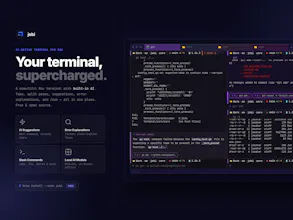
jebi is a supercharged Mac terminal with built-in local AI — no API key, no subscription, no cloud. After every command, it suggests what to run next. Hit an error? jebi explains it in plain English and tells you how to fix it. Type /ask to chat with AI right in your terminal. All AI runs on-device with Qwen, Phi-3, and Gemma — your commands never leave your Mac. Beautiful UI, split panes, tabs, custom themes, grain texture, and slash commands like /ls and /ports.


The restraint is what sells it for me — AI that only speaks up after an error or a finished command beats an always-on copilot stealing focus. With Qwen, Phi-3, and Gemma all running on-device, how do you route between them: is each model pinned to a task (error-explain vs /ask vs next-command suggestion), and what's the rough resident memory footprint with them loaded? On a 16GB Mac that's the one thing I'd want to know before switching my daily terminal.
@hi_i_am_mimo Great question on the routing — right now jebi uses one active model across all AI features (error explanations, suggestions, /ask). You pick it in Preferences → AI and it serves everything. No per-task routing yet, though that's an interesting direction.
On memory: for 16GB, I'd recommend Qwen2.5 1.5B (1.1GB, fast) or Gemma 2 2B (1.6GB, balanced) — both leave plenty of headroom. If you want more quality, Phi-3 Mini 3.8B (2.2GB) or Qwen2.5-Coder 3B (1.9GB, code-focused) are solid mid-tier options. I run Qwen3 4B on a 24GB machine and it sits comfortably without impacting anything else.
That clears it up — one active model you swap in Preferences is simpler than juggling per-task routing anyway. Quick follow-up on the on-device side: does the selected model stay resident between commands, or unload when idle to free RAM? And switching models in Preferences, is that a warm swap or does it reload weights cold each time?
@hi_i_am_mimo The model stays resident once loaded — no unloading between commands, so there's no reload latency on each use. On model switching: changing the active model in Preferences triggers a full restart of the AI backend, so it's a cold reload rather than a warm swap. Takes a few seconds but you only do it occasionally, so in practice it's not an issue.
The terminal is such an interesting place for this because the cost of a wrong suggestion is higher than in a text editor. Curious how you're thinking about trust: does jebi mostly suggest/explain, or can it also take action directly inside the shell?
@vidur_saini Really well put — that's exactly the tension we thought about a lot. jebi is strictly suggest-and-explain, never act. It shows next-command suggestions as chips, you click or press ⌘⌥1/2/3 to run — nothing executes without user consent.
local model in the terminal is the right instinct — the cloud round-trip is what kills flow when you just want a quick command rewrite. the quality-vs-resident-size tradeoff is where this gets interesting.
@qifengzheng Exactly — the round-trip latency is the killer for flow. On the tradeoff: jebi lets you choose from 7 models (Qwen3 4B/8B, Gemma 3, Phi-3, and more) so you can match the model to your machine — pick a lighter 1.1GB model for speed or go up to 5GB for quality. The scope is also narrow enough that you don't need GPT-4 scale — a model that understands shell commands and your session context beats a smarter model with a 2-second cloud round-trip.
the 1.1–5GB ladder is the honest answer — picking the right rung is the per-mac calibration problem most local-AI products quietly punt. narrow-scope-beats-larger-cloud-model is the real wedge when the agent only needs shell context, not world knowledge.@jawahars16
@qifengzheng Thanks for your input. We're trying to close the gap choosing the right model — the labels (Fast, Balanced, Best quality) against the models on preferences screen is just a start. But updating those labels and auto recommending models based on available RAM could be a wonderful addition.
Running local AI after every command is such a thoughtful UX — it flips the terminal from reactive to proactive. Did you find Qwen vs Phi-3 vs Gemma meaningfully different for the command-suggestion use case, or do they all land around the same quality?
@dannyheng Thanks! Qwen does edge out Phi-3 for this use case — it handles shell context and command names more reliably, especially with less common CLIs. The gap isn't huge for everyday commands; Qwen just tends to hallucinate less when the output is messy or truncated.
Local AI in the terminal is interesting specifically for the privacy angle - no API calls, no data leaving the machine. What model are you running locally, and how did you approach the tradeoff between model size and response latency? Inference speed feels like the main constraint here.
@demi_tan Exactly — privacy was the primary driver. The whole point is that your session context (commands, output, working directory) never leaves your machine, and that only works if inference is local.
On the model side, we support a few options that users can switch between. The latency tradeoff is real — we lean toward smaller, faster models since the use case is suggestion and assistance, not deep reasoning. A 200ms response after every command feels natural; a 2s wait breaks the flow.
Can you tune how proactive it is or turn suggestions off for certain commands?
@naimz Yes! Head to Preferences → AI → Advanced — you can toggle command suggestions, error explanations, directory context, and output analysis independently. Turn off just what you don't want.