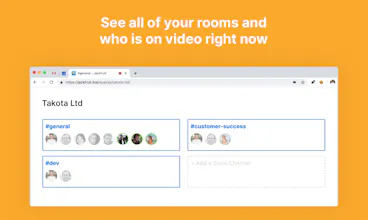
No more copy-pasting video conference links to Slack. Jackfruit adds an always-on video room to every channel that you invite it to. Use it for meetings, or just hang out there while you work.
Tried this and totally can see how useful it is. It got a bit boring after a while as a single founder, until I discovered I can just open multiple browser tabs to deal with this problem. Now it feels like we're a team of clones running a startup.
@bproost It's almost like you're Bart the same person in the video named Bart that used it. I guess being you're friends with the owner one could assume you were being ironic.
Report
tried it in our team. One team member couldnt see us, we came up as white boxes. The rest of the team could see each other but she came up as a white box.
@mark_santoso OK thanks for your feedback. Looking into it.
Report
?makers I loved the concept, but I could not quite get it to work as expected.
1. It just says "Someone joined the call" and not who did
2. I could not get a list of who all are actually in the room without joining it. The screenshots on the website indicated that it would be possible, but for me, just some static container that said "Jimmy Jam" is there and not the actual list of people in the room.
Seemed like fairly large issues to me. Not sure if this app is still in development.
Report
This is awesome, and I could totally see how it would be useful! Unfortunately, without the ability for people to easily mute your own microphones, it's unusable for our team. It's just too noisy!
@tomchapin Hi Tom - you can now mute your mic and hide your video in the app. I hope that it's now suitable for your team and I'd love to hear any additional feedback you have.
Hey everyone 👋
I got tired of sharing links to various video conferencing services in Slack, so I thought it would be interesting to attach a video hangout to a Slack channel that's always on.
A video room also serves as a kind of 'water cooler' for your team. If anyone wants to co-work on video they can jump into the room at any time and ask others to join them by clicking on their faces. The bot also posts to the channel if a few peoole just joined the video.
Add it to your Slack with one click: https://jackfruit.live/add-to-slack/
You can use it with public and private channels. Let me know if have any questions!
Report
added it today to our work slack. easy to use, very simple. what's not to like?
Sound.xyz
meals.chat
meals.chat
meals.chat
meals.chat
meals.chat
meals.chat