Launched this week

Instagram CLI

Brainrot-free terminal client for Instagram

2 followers

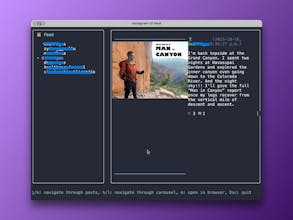
Instagram CLI allows you to stay connected while minimizing distractions from social media, enabling 100% keyboard control, and accessing it from any terminal, whether in your VSCode editor or your Linux server, so it doesn't break your workflow. It removes all reels/ads/suggested content, so you can chat with your friends without falling into endless brainrot, stay updated & connected without being exploited for your attention, and focus on meaningful conversations and be productive.
Instagram CLI gallery image
Launch Team / Built With
Migma AI
Migma AI
Lovable for Email
Promoted

What do you think? …

James Zheng
Maker
📌
Hey guys, Like a lot of people here, I struggle with Instagram. The algorithm is just too good at its job—I go in for a quick DM and come out 20 minutes later wondering where the time went. To solve this, we built Instagram CLI. It’s a way to stay connected to your actual social circle without the constant pull of doomscrolling. It blocks all ads/Suggestions/Reels, you only see what you intentionally look for. And since it’s a TUI, you can send a quick message without ever leaving your IDE or terminal window. Currently, it has: - DMs with real-time message updates and image rendering directly in terminal - Viewing feed and stories only from people you follow - Developer friendly shortcuts so you can use Instagram with full keyboard control - Supports Linux, MacOS, Windows, and all major terminal emulators NPM: npm i -g @i7m/instagram-cli Homebrew: brew tap supreme-gg-gg/tap && brew install instagram-cli We’d love to hear what you think and improve our project! Welcome contributions and bug/features issues. DISCLAIMER: This is an unofficial project and is not affiliated with Meta. Use it responsibly.