InLabels: Labels for LinkedIn

InLabels: Labels for LinkedIn

Organize your messages without leaving LinkedIn

149 followers

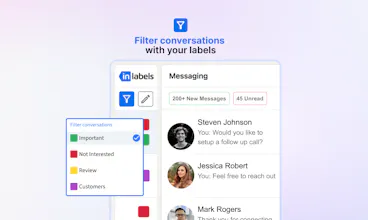
InLabels is a Chrome extension that lets you label and organize your LinkedIn messages. No sign-in needed. Add up to 4 custom labels, rename them, and filter your conversations for easy management. Simplify your LinkedIn inbox with ease.
InLabels gallery image
Free
Launch tags:SalesSaaSLinkedIn
Launch Team / Built With
Anima - OnBrand Vibe Coding
Design-aware AI for modern product teams.
Promoted

What do you think? …

Hrishi Kumar
Hello Hello everyone! 👋 We're building Inlabels - a chrome extension that allows you to label your LinkedIn messages 😄 Use this link to start for free - https://chromewebstore.google.co... The idea is to bring all Email Inbox features to LinkedIn 🚀 LinkedIn is the most popular networking platform out there but it doesn't have the greatest experience 👎 We're trying to make sales on LinkedIn easier by bringing some color to your conversation 🌈 Please use it and let us know your feedback 🙏 We're doing an early beta launch for completely FREE! 😉 Note: - You don't need to sign in with LinkedIn and we won't ask for your credentials - It works on top of the LinkedIn page so you don't have to sync messages to a CRM
Pradhumn Vijayvargiya
@founderinlabels does it take cookies? Would love to see a few automations, kudos if you're already in the process of launching a few.
Samuel Darwin
@founderinlabels As someone who lives and breathes sales pipelines, I'm excited about the potential here. Have you considered integrations with popular CRM systems? It would be incredibly powerful to have a two-way sync where our LinkedIn interactions automatically update our CRM, and vice versa. For example, if I move a lead to "Proposal Sent" in the CRM, it'd be great if that label automatically appeared in LinkedIn. This could help ensure our team's LinkedIn outreach always aligns with the current stage of each deal.
Hrishi Kumar
@prad_vv We don't and we also don't need LinkedIn sign in. It's going to be a simple tool to apply labels and filters. We're looking at notes, reminders and CRM sync as features in the future.
Kyrylo Silin
Hey Hrishi, Are you considering expanding to other social platforms or adding more advanced labeling features? How do you handle data privacy concerns, given that you're interacting with users' LinkedIn messages? Congrats on the launch!
Hrishi Kumar
@kyrylosilin Thanks Kyrylo - We're going more deep on adding features on LinkedIn like adding notes, reminders, CRM sync, auto labeling, etc. We can't read messages, we just apply labels to them. And we don't need your LinkedIn credentials.
Hila Shmuel
Ok this is simple yet amazing which makes it a great idea. as a solo founder juggling between customers, works friends, vcs, this is a great way to make the linked way more efficient. like a CRM in the LinkedIn inbox. well done! :)
Kelly Kim
@hilash I agree. I think labeling according to categories would greatly reduce switching costs!
Nitesh Jamod
The launch of InLabels was a smashing success! This clever Chrome plugin fixes a major flaw in LinkedIn's messaging system, making the platform more organised and productive.
Hrishi Kumar
@nitesh_jamod Nitesh you hit the nail in the head man. That's exactly what we built. Excited to see you use it and get your feedback.
Ivelin Kozarev
Cool and useful tool, good luck with the launch!
Malaika Kumar
Been using it for a week and my LinkedIn inbox has never been this Organized! Something linkedin should've done ages ago 10/10
Congratulations on the launch of InLabels! This Chrome extension elegantly addresses a key gap in LinkedIn's messaging system, enhancing organization and productivity. Will there be plans to increase the number of custom labels and introduce smart labeling suggestions, and are there any upcoming features to support bulk labeling or message templates?
Hrishi Kumar
@flowsz Great question! The answer is a big YES. We're looking to add notes, reminders, CRM sync and auto-labelling in the future. All dependant on feedback from our users.
123
Next
Last