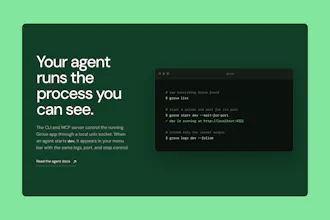
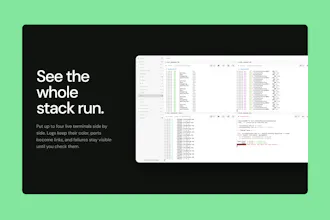
Grove is an AI-native macOS script runner designed to unify your terminal experience with your AI coding agent. It allows both you and your agent to control the same terminal processes, streamlining development workflows. Upon connecting a folder, Grove automatically sets up a menu bar, CLI, and a MCP server to manage real terminal processes. You can start, inspect, and stop these processes seamlessly.
Hey Product Hunt,
I built Grove because I kept losing track of project scripts across terminal tabs. Once I started working with coding agents, the problem got worse. An agent would start another dev server because it could not see the one I already had running.
Grove gives both of us control over the same processes.
Connect a folder and Grove finds scripts across Node, Deno, Python, Rust, Go, Make, and monorepos. Start them from the menu bar, CLI, or built-in MCP server. Every process has shared logs, detected ports, status, and a stop control that also terminates its children.
The scripts run in real pseudo-terminals, so colors, prompts, progress bars, signals, and shell environments work as expected.
Grove also integrates with Apple Intelligence. On a compatible Mac running macOS 26, you can press Explain after a script crashes. Grove removes anything shaped like a token or password before Apple's on-device model reads the end of the log and summarizes the failure.
I'd especially like feedback from developers using coding agents for local development. How are you handling shared dev servers and background processes today?
Report
the agent booting a second dev server bcoz it cant see mine has happened to me more than once. built in MCP server is why im looking. nice launch rakesh
the shared-visibility problem is real and I've hit the exact same duplicate-dev-server thing. what happens when you and the agent both reach for the same process at the same moment though - say you restart it manually right as the agent sends a stop signal? is there any locking, or is it just "last command wins" and you sort out the mess after?
@galdayan No lock. Both commands go through the same actor, so there's no crash or corrupted state, but nothing tracks which command was chasing which process.
Most of the time that doesn't matter, since a duplicate stop just resends the same signal. The one bad case: if your restart already finished and a new process is up by the time the agent's stop message arrives, that stop kills the new one instead of doing nothing. It has no way to know the process underneath changed.
So it's not "last command wins" in a clean sense. It's "whichever command arrives last acts on whatever's running right now," and today there's no check for whether that's still the process it meant to touch.
@itsrakesh that stale-process case is the one that would actually bite someone in practice, not the duplicate-signal case. feels like the fix isn't even locking, just tagging each stop message with the pid or a generation counter it expects to kill, so a late stop can no-op instead of murdering whatever happens to be running now. curious if that's on your radar or if it's rare enough in practice not to bother yet
Report
hello Rakesh, keeping tabs on everything running quietly in the background has worn me down more than I like to admit.
Having it all gathered in one calm spot would lift a real weight, and the part where my AI helper and I finally see the same thing is what stuck with me.
Grove
the agent booting a second dev server bcoz it cant see mine has happened to me more than once. built in MCP server is why im looking. nice launch rakesh
Grove
@niveditha_patluri1 You got the point 💯. Thanks
Grove
Feel free to ask anything!
Dial
the shared-visibility problem is real and I've hit the exact same duplicate-dev-server thing. what happens when you and the agent both reach for the same process at the same moment though - say you restart it manually right as the agent sends a stop signal? is there any locking, or is it just "last command wins" and you sort out the mess after?
Grove
@galdayan No lock. Both commands go through the same actor, so there's no crash or corrupted state, but nothing tracks which command was chasing which process.
Most of the time that doesn't matter, since a duplicate stop just resends the same signal. The one bad case: if your restart already finished and a new process is up by the time the agent's stop message arrives, that stop kills the new one instead of doing nothing. It has no way to know the process underneath changed.
So it's not "last command wins" in a clean sense. It's "whichever command arrives last acts on whatever's running right now," and today there's no check for whether that's still the process it meant to touch.
Dial
@itsrakesh that stale-process case is the one that would actually bite someone in practice, not the duplicate-signal case. feels like the fix isn't even locking, just tagging each stop message with the pid or a generation counter it expects to kill, so a late stop can no-op instead of murdering whatever happens to be running now. curious if that's on your radar or if it's rare enough in practice not to bother yet
hello Rakesh, keeping tabs on everything running quietly in the background has worn me down more than I like to admit.
Having it all gathered in one calm spot would lift a real weight, and the part where my AI helper and I finally see the same thing is what stuck with me.
Grove
@amine_aziz_alaoui Thanks Amine, that “worn me down more than I like to admit” feeling is exactly what pushed me to build this.