GoThru

GoThru

The Future of 360 Virtual Tours

6 followers

GoThru is best 360 virtual tour software for your business. Take your 360 images to the next level and explore them in an immersive Virtual Reality space!
GoThru gallery image
Payment Required
Launch Team
Auth0
Auth0
Start building with Auth0 for AI Agents, now generally available.
Promoted

What do you think? …

Alina Bugeag
Maker
📌
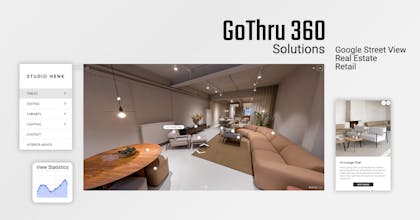
GoThru is a comprehensive platform that specializes in creating, editing, and publishing 360-degree virtual tours for Google Street View and offering the most advanced platform for 360 tools, creating the most detailed custom virtual tours. It offers a suite of tools and services tailored for professional 360 photographers, businesses, and organizations looking to enhance their online presence through immersive virtual experiences. Here's a detailed breakdown of what GoThru offers: 1. Panorama Connector Overview: The Panorama Connector tool is one of GoThru's core products, designed to help users connect multiple 360-degree panoramas into seamless virtual tours. Key Features: Google Street View Integration: Users can publish their 360-degree panoramas directly to Google Street View, enhancing their visibility on Google Maps and Google Search. Auto-Leveling: This feature automatically corrects the leveling of panoramas, ensuring that the images are properly aligned, particularly useful for images with lots of straight lines. Multi-Pano Connection: Users can connect numerous 360 panoramas, creating comprehensive tours of large spaces. Best For: 360 photographers and businesses looking to publish high-quality virtual tours on Google Street View. 2. Virtual Tour Editor Overview: GoThru's Virtual Tour Editor allows users to create interactive and enhanced virtual tours with various customizations. Key Features: Hotspots: Users can add interactive hotspots to the tour, providing additional information, such as text, images, or links. Menus and Carousels: The tool supports the creation of side menus, carousel menus, and control bar buttons to enhance navigation and user experience within the virtual tour. Customization: The editor offers a range of customization options to tailor virtual tours to specific branding and informational needs. Best For: Businesses and photographers who want to create engaging and interactive virtual tours for websites, marketing, and customer engagement. 3. Mobile and Desktop Apps GoThru Street Editor: A mobile app designed for connecting panoramas directly from a mobile device, making it easier to edit and manage virtual tours on the go. GoThru Desktop App: A tool for working with 360 videos, including the ability to extract 360 images from videos and associate them with GPS data. This is particularly useful for virtual tour creators working with 360 video content. 4. Walkthrough Videos Overview: GoThru offers a feature that enables users to create walkthrough videos from 360 panoramas. This tool automatically transitions from one panorama to another, creating a smooth video walkthrough of a space. Formats: Standard Video: A regular video format that can be used for various purposes. 360 Video: A 360-degree video slideshow that can be uploaded to platforms like YouTube or Facebook, allowing viewers to spin around and explore the scene interactively. Best For: Businesses and photographers looking to showcase spaces in a video format that provides a dynamic and immersive experience. 5. Downloadable Virtual Tours Overview: GoThru allows users to download the virtual tours they create and host them on their own servers. Benefits: Offline Access: Users can host the virtual tours on their websites or internal servers, ensuring access even without internet connectivity. Control: Provides users with greater control over the hosting and distribution of their virtual tours. Best For: Organizations that require self-hosting options for internal use, security, or specific customization needs. 6. VR Exploration with GoThru Navigator Overview: GoThru Navigator is a VR app available for Oculus Quest, iOS, and Android devices. It enables users to explore virtual tours in an immersive VR environment. Key Features: Immersive VR Experience: Allows users to explore virtual tours in a highly immersive VR setting, enhancing the sense of presence and engagement. Best For: Businesses and users looking for an immersive VR experience for virtual tours, such as real estate, tourism, and education. 7. Partnerships and Integrations Camera Partnerships: GoThru is partnered with camera manufacturers like Insta360 and Trisio, offering discounted prices for their cameras to GoThru users. This helps photographers and businesses get the right equipment for creating high-quality virtual tours. Platform Integrations: GoThru’s tools integrate seamlessly with Google Street View, making it a go-to platform for publishing professional-grade virtual tours to Google Maps. 8. Additional Features and Services Auto-Leveling: Corrects images to ensure a level horizon, especially useful for professional photography with a lot of straight lines. GPS Integration: For 360 videos, the desktop app can extract images and associate them with GPS data if the video file has a GPS track, making it easier to position panoramas accurately on maps. Who Can Benefit from GoThru? 360 Photographers: Professionals seeking a comprehensive platform to create, edit, and publish virtual tours. Businesses: Real estate agencies, tourism businesses, educational institutions, and others that want to create interactive virtual tours for marketing, customer engagement, or documentation. Content Creators: Those looking to produce immersive walkthrough videos and VR experiences. Developers and Agencies: Agencies offering virtual tour services to clients and developers needing advanced tools for virtual tour creation. GoThru stands out for its robust set of tools, user-friendly interfaces, and ability to cater to both beginners and advanced users in the 360 photography and virtual tour space.