Glance Analytics

Glance Analytics

Google Analytics without the Google

8 followers

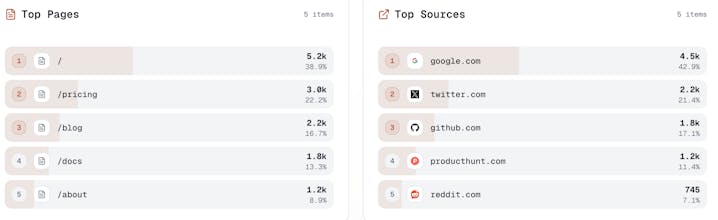
Tired of GA4's complexity and privacy headaches? Glance Analytics gives you the metrics that actually matter pageviews, sessions, referrers, and visitor insights without cookies, without consent banners, and without sending your users' data to Google. One script, GDPR-compliant out of the box, and dashboards you can actually understand. Built for indie hackers and developers who ship fast and respect their users.
This is the 2nd launch from Glance Analytics. View more
Glancelytics

Glancelytics

Privacy-first website analytics
Simple, privacy-focused website analytics without cookies or personal data collection. GDPR compliant, lightweight tracking script under 1KB. Start free.
Glancelytics gallery image
Free Options
Launch Team / Built With
Vy - Cross platform AI agent
AI agent that uses your computer, cross platform, no APIs
Promoted

What do you think? …

Fiston
Maker
📌
I built Glancelytics after getting completely frustrated with modern analytics. For most of my projects I just wanted to know: How many people visited? What pages did they read? Where did they come from? Instead, I ended up wrestling with GA4, giant consent banners, and tools that felt more like surveillance than simple analytics. It didn’t sit right with me as a developer or as a user who cares about privacy. Glancelytics is my attempt to fix that: a privacy‑first, cookieless analytics tool that gives you only the metrics that matter in a clean, fast dashboard. Under the hood it uses a daily, salted hash instead of cookies, so we never store raw IPs and don’t track people across sites, while still giving you accurate visitor counts. During the build, my approach evolved from “just ship a GA alternative” to “design something I’d actually feel good putting on my own sites” — simple setup, modern stack (Next.js, Neon, Upstash, Clerk, Vercel), and privacy‑by‑default baked into every decision. If you’re a developer, indie hacker, or small team who wants insight without creeping on your users, I’d love your feedback on this first version.
Chilarai M

Great idea. Still want to know, how do you handle duplicate traffic?

Fiston
Maker

@chilarai  Great question! We handle duplicate traffic in a few ways:

The main thing is we use a 20-minute deduplication window. If the same visitor hits your site within 20 minutes, we only count it once. This prevents things like page refreshes or accidental double clicks from inflating your numbers.

We identify visitors by creating a privacy-preserving hash from their IP + user agent + the current date. This changes daily (for privacy) but lets us accurately deduplicate within each day. No cookies needed!

We also track unique visitors separately, so even if someone visits 10 times in a day, they're still counted as 1 unique visitor. And our script is smart about single page apps, it only tracks when the URL actually changes, not every little navigation event.

Plus we filter out bots and crawlers automatically by checking user agents and looking for missing browser signals like screen resolution or timezone.

So basically real traffic gets counted once, spam and bots get filtered out. We want your analytics to be accurate, not inflated!

Chilarai M

@the_droid nice! More power to you!

Fiston
Maker
@chilarai Thanks so much Chilarai! Really appreciate the support. Are you currently using any analytics tool for your projects?
Chilarai M

@the_droid yes Google Analytics