Launching today

fswitcher
cmd+tab, the way it should work
69 followers
cmd+tab, the way it should work
69 followers
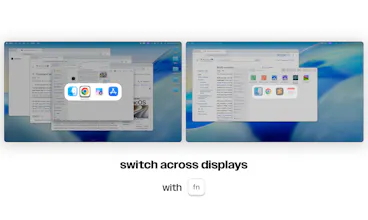
cmd+tab replacement for macOS built for multiple displays. It looks and feels like the original, with proper handling of app switching, window switching, and multiple displays. One-time purchase, and no subscriptions.




Hey everyone, I'm Fernando. I've been building iOS apps for 16 yrs. I've always felt like cmd+tab could work better but didn't find the time to fix it until now.
These were my qualms with the native one:
- cmd+tab would open on the wrong display
- switching to an app would sometimes take me to the wrong screen, app or window
- switching to some apps wouldn't open them
- too many apps cluttering the switcher
- no way to control other displays
The idea was to stay close to the native one, while fixing these issues without a subscription, so it's a one-time $5.99.
What annoying thing did I miss from the native one?
Does it remember which display each app was last on? With two screens cmd+tab keeps throwing me to the wrong one.
@thomas_wazza yes! It shows up on the active display, and you can easily switch with fn when the switcher is open
Does it handle full-screen apps and windows on other Spaces? With the native switcher, jumping to an app in full screen on the other monitor sometimes slides the whole Space around and I lose track of where I was.
@guilherme_michels yes, that's how I use it. It handles multiple apps, windows, and full-screened instances across different desktops and multiple displays pretty smoothly. You also only switch per display, so it doesn't slide around the other display like you mentioned.
Too bad I don't have a regular keyboard anymore
@michaelbrusegard what kind of keyboard do you have? I'm working on adding support for hot corners and potentially custom key binds
The wrong-display problem is the one I notice most. With two screens, cmd+tab opening on the wrong display — or landing on the wrong window — breaks the flow more than a missing feature would. Showing the switcher on the active display and letting fn move it to another display sounds like the right fix, and keeping it close to the native feel instead of rebuilding the whole interaction makes it easier to trust. The one-time purchase, with no subscription, is a welcome part of that too.
@jcbuilds oh yeah definitely. That was the first thing I addressed because of how annoying it was haha. Yes, I wanted to stay as close as possible to what people are already used to. I'm happy with how it turned out. Besides the multi-display issues you've seen with the default one, what other things get in your way?
Love the focus on keeping the native macOS feel while solving the multiple display problem. And a one-time purchase instead of another subscription is always a plus!
Thank you @jacopo_giudici, yeah I didn't want to create something people would have to figure out how to use. I wanted to simply improve what people are already used to and make it finally work how they expect it to. And yes subscriptions are everywhere nowadays, I figured if you make a great product, people won't mind a one-time fee.