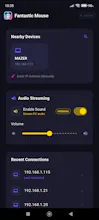
Use your phone to control the mouse on PC or laptop. No cable or physical mouse needed. No more struggling with broken mouse scroll. Install Fantastic Mouse as your remote wifi mouse app on your phone. Install the server app on your Windows PC or Mac or Linux system, hit connect and remotely control the mouse by moving finger on the touch screen of your phone. Trackpad supports different mouse gestures including two finger scroll, side slide scroll, two finger zoom etc.
I needed a mouse phone app myself. I was struggling with problematic mouse myself and there were times I wanted to take my laptop here and there without too many wires. Fantastic Mouse is perfect when you dont have a physical mouse around or the battery of your mouse is dead or mouse broken. But it doesn't stop there. Premium features let you hear the PC's sound on your phone, or type via on screen keyboard. or run terminal commands from your phone.