Launching today
DAMP

DAMP

Docker-powered PHP development without the CLI complexity

2 followers

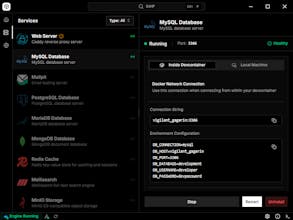
ComCreate production-ready PHP projects in seconds with Docker containers—no terminal needed. Get automatic HTTPS domains, one-click MySQL/Redis/PostgreSQL services, VS Code DevContainers, and ngrok tunnels built-in. All the power of Docker with the simplicity of a desktop app.plete Docker-based development environment for PHP applications.
DAMP gallery image
DAMP gallery image
DAMP gallery image
Free
Launch Team
AssemblyAI
AssemblyAI
Build voice AI apps with a single API
Promoted

What do you think? …

Matic Vertačnik
👋 Hey Product Hunt! I'm creator of DAMP. Why I built this: I spent years switching between XAMPP (version conflicts nightmare), Laravel Herd (great, but not Docker), and raw Docker CLI (powerful, but exhausting to remember commands). I wanted Docker's production-parity without memorizing docker-compose syntax or editing YAML files at 2 AM. What makes DAMP different: No CLI Required - Click buttons, not terminal commands. Configure services via dialogs, not YAML. Automatic HTTPS - Every project gets yourapp.local with SSL certificates via Caddy. No manual setup. True Isolation - Run PHP 7.4, 8.2, and 8.4 simultaneously across projects. Zero conflicts. DevContainer Ready - Auto-generates VS Code DevContainers with Xdebug pre-configured. 14 Services, 1 Click - MySQL, PostgreSQL, Redis, Valkey, MongoDB, Mailpit, MinIO, and more—visually managed. Perfect for: Freelancers juggling client projects with different requirements, teams wanting reproducible environments, or anyone who prefers GUIs over memorizing Docker commands. It's open-source, free, and actively maintained. I'd love your feedback—especially if you've struggled with Docker CLI or outgrown XAMPP! What features would make your dev workflow smoother? Download: https://getdamp.app GitHub: https://github.com/PickleBoxer/d...