Launched this week
Crypto-Miner-Optimizer

Crypto-Miner-Optimizer

AI-Powered GPU Cryptocurrency Mining Optimization Tool

2 followers

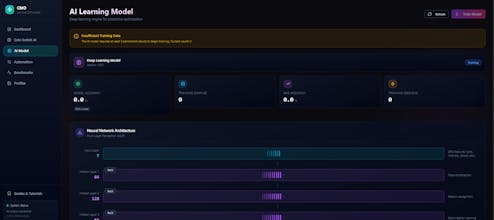
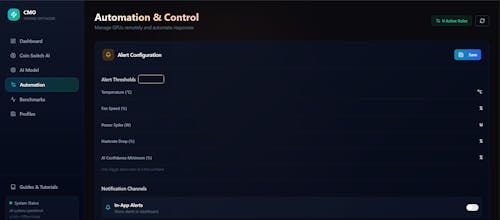
Crypto Miner Optimizer (CMO) is a comprehensive desktop application designed to help cryptocurrency miners maximize their GPU mining efficiency. Using AI-powered optimization algorithms, CMO automatically tunes your GPU settings for optimal hashrate-to-power ratios while providing real-time profitability tracking across multiple cryptocurrencies.
Crypto-Miner-Optimizer gallery image
Free
Launch tags:Crypto•GitHub•Bitcoin
Launch Team
Flowstep
Flowstep
Generate real UI in seconds
Promoted

What do you think? …

Nicole
Maker
šŸ“Œ
Maximize your mining efficiency with deep learning-based GPU tuning and real-time profitability analysis. Features: šŸŽÆ AI-Powered GPU Optimization Deep Learning Optimization: Uses machine learning to predict optimal GPU settings based on your hardware Automatic Tuning: One-click optimization for core clock, memory clock, and power limits Continuous Learning: The AI model improves over time by learning from your GPU's performance data šŸ“Š Real-Time Monitoring Live GPU Stats: Monitor hashrate, power consumption, temperature, and efficiency in real-time Historical Charts: Track performance trends over time with interactive visualizations Multi-GPU Support: Manage and monitor multiple GPUs from a single dashboard šŸ’° Profitability Analysis Live Market Data: Real-time cryptocurrency prices with automatic updates ROI Calculator: Calculate daily, weekly, and monthly profits per GPU Algorithm Comparison: Compare profitability across different mining algorithms Price Alerts: Set custom alerts for cryptocurrency price movements šŸ”„ Predictive Coin Switching AI Predictions: Machine learning-based predictions for optimal coin switching Auto-Switch Configuration: Automatically switch to the most profitable coin Prediction Accuracy Tracking: Monitor and improve prediction accuracy over time āš™ļø Automation & Profiles GPU Profiles: Save and load custom GPU settings profiles Automation Rules: Set up rules for automatic GPU management Hardware Alerts: Get notified about critical hardware events (overheating, fan failures, etc.) Remote Control: Manage your GPUs remotely šŸ“ˆ Benchmarking Comprehensive Benchmarks: Run detailed performance tests on your GPUs Algorithm-Specific Tests: Benchmark performance for different mining algorithms Performance Comparison: Compare results across different settings and configurations šŸ„ GPU Health Monitoring Predictive Failure Detection: AI-based prediction of potential hardware failures Health History Logging: Track GPU health metrics over time Preventive Alerts: Get warned before critical issues occur